Answer

Automation based on Date

  • April 7, 2022
  • 4 replies
  • 182 views

aryanda

Hi,

I want to create an automation based on a Date field. The automation should trigger 3 days before the given date. However, I only get the following options:
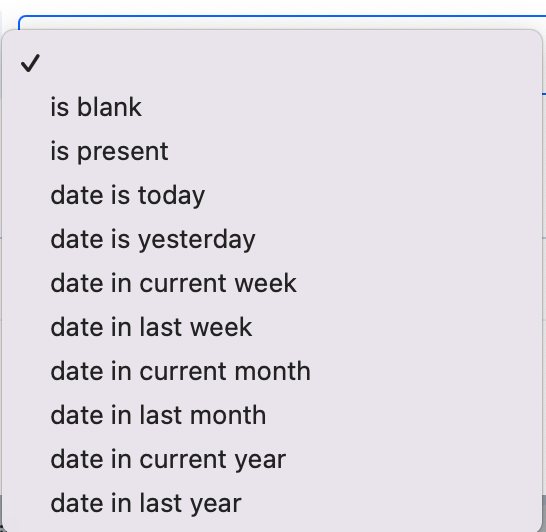
Can anybody help?

Best answer by genietim

Exactly, i too would have suggested to use relative dates! They are really mighty and also work for due-date fields, which enables you to use them as triggers for the automation (note that the autofill only works in combination with datetime fields, e.g. if you want to have them auto-filled 3 days before the user-inputed date, the latter would have to be a datetime field)

4 replies

alicereis
Forum|alt.badge.img+5
  • Inspiring
  • April 8, 2022

@aryanda, unfortunately Pipefy does have this limitation. When I need some automation like this, I use a third-party integrator. I recommend that you take a look at Integromat/Make, but be sure to file an improvement request for Pipefy.


Lais Laudari

Hi @aryanda, how are you doing?

You can do this using relative dates!
Check this article out! If have any doubt, please let me know!😉

https://help.pipefy.com/en/articles/2109244-relative-dates


genietim
Forum|alt.badge.img+12
  • Legend
  • Answer
  • April 21, 2022

Exactly, i too would have suggested to use relative dates! They are really mighty and also work for due-date fields, which enables you to use them as triggers for the automation (note that the autofill only works in combination with datetime fields, e.g. if you want to have them auto-filled 3 days before the user-inputed date, the latter would have to be a datetime field)


rafael.jefte
Forum|alt.badge.img+6

Hi @aryanda, how are you doing?

You can do this using relative dates!
Check this article out! If have any doubt, please let me know!😉

https://help.pipefy.com/en/articles/2109244-relative-dates

Really! I use this automation with relative dates and it helps me.