Solved

Backups

  • September 22, 2020
  • 6 replies
  • 881 views

Paulo Ribas
Pipefy Staff

How can we get a backup of whole documents we upload to the platform time to time as an offline backup? In the same way, about the info, can we get a backup of that?

Best answer by Paola Botelho

Hello Paulo. You can easily export all the info you input inside Pipefy using our reports section. The same will happen with files and documents. The URLs are valid for 15 days, so make sure to download all files before that. It’s good to highlight that Pipefy can be used as a repository to our documents as well.


6 replies

Paola Botelho
Pipefy Staff
  • Pipefy Staff
  • Answer
  • September 22, 2020

Hello Paulo. You can easily export all the info you input inside Pipefy using our reports section. The same will happen with files and documents. The URLs are valid for 15 days, so make sure to download all files before that. It’s good to highlight that Pipefy can be used as a repository to our documents as well.



rafael-fortes

É sério que vocês não disponibilizam o Backup juntamente com os arquivos? Se eu fiquei 10 anos com a ferramenta e tenho 30.000 processos, eu teria que entrar um a um para realizar o backup das informações? É isso?


marcosmelo
Forum|alt.badge.img+18
  • Legend
  • September 18, 2023

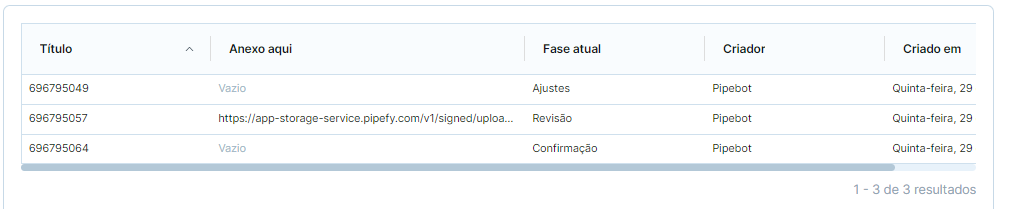
Oi, @rafael-fortes, Uma sugestão, nasei sei se te ajuda. Criando um relatório do que voce precisa, voce pode incluir todas as informações dos cards, inclusives os anexos que são disponibilizados em forma de URL que direcionam para estes.


marcosmelo
Forum|alt.badge.img+18
  • Legend
  • September 18, 2023

Segue um exemplo, simples, onde voce pode manter o relatorio salvo no Pipefy ou baixar a planilha, contendo todas as informações do Card
Espero que te ajude


Ace3838
  • Inspiring
  • August 11, 2026

Is there a way to automatically download and backup database attachments?  


Gustavo Ledoux

Hello everyone — picking up on Paulo's original question and the follow-ups (including the recent one about automatically backing up database attachments).

There are really two different problems hiding under the word "backup":

  1. Exporting your data (fields, card info, history) → self-service, via Reports
  2. Getting the actual files offline (attachments, documents) → partial self-service + optional full backup via Support

Here's how each path works, when to use it, and what the platform doesn't do natively yet.


Two paths at a glance


  Path 1 — Reports (self-service) Path 2 — Full org backup (Support)

What you get

Spreadsheet (Excel/CSV) with all card data

Encrypted ZIP files with data + actual files

Attachments

URLs in the spreadsheet — not the files themselves

Files included (card_attachments/field_attachments/, etc.)

Scope

One pipe or database at a time

Entire organization (or selected content)

Link validity

Report download URL: ~1 hour. Attachment URLs inside the sheet: ~30 days

Download links: 24 hours

Automation

Possible via API + external scheduler

Request-based (not recurring/self-service)

Best for

Regular exports, integrations, moderate volume

Compliance, migration, large-scale offline archive


Path 1 — Export data + attachment URLs via Reports

This is the self-service route. It works for pipes and databases.

Step-by-step (UI)

  1. Open the pipe or database → Reports
  2. Create a report that includes all the fields you care about, especially Attachment fields
  3. Export the report (Excel or CSV)
  4. The spreadsheet will contain signed URLs pointing to each file — not the files embedded in the sheet
  5. Download the files from those URLs before they expire (~30 days for attachment links; the report file itself expires much sooner, ~1 hour)

Tip from @marcosmelo: save the report configuration inside Pipefy so you can re-export anytime without rebuilding it from scratch.


When this breaks down

If you have tens of thousands of cards and thousands of attachments, manually clicking every URL is not realistic. That's the frustration @rafael-fortes raised — and it's valid. Reports give you the index (what exists and where), not a one-click file dump.


Path 2 — Full backup with files (via Pipefy Support)

For a complete offline copy — data and files bundled together — Pipefy offers an organization-level backup handled by our Support team.

What you receive:

  • Encrypted ZIP files (password-protected)
  • Folders like card_attachments/field_attachments/email_attachments/
  • mapping/ folder with CSVs that link technical file names back to card names, pipe IDs, and field labels

Important constraints:

  • Download links expire in 24 hours — grab everything immediately
  • Processing time depends on volume
  • This is a request-based process, not something you trigger on a schedule from the UI

If you're on an Enterprise plan or have compliance requirements, reach out to your Customer Success Manager or Pipefy Support to request this.


Automating attachment backups (API route)

To answer @Ace3838's question — there is no native "auto-backup attachments" toggle in Pipefy today. But you can build a recurring workflow:

The pattern

[Schedule] → exportPipeReport (API) → poll until done → download spreadsheet

→ parse attachment URLs → download files → store locally (Drive, S3, etc.)

GraphQL example

1. List reports in a pipe:

query {
pipe(id: "YOUR_PIPE_ID") {
reports {
id
name
}
}
}

2. Trigger an export:

mutation {
exportPipeReport(input: { pipeId: "YOUR_PIPE_ID", pipeReportId: "YOUR_REPORT_ID" }) {
pipeReportExport {
id
state
}
}
}

3. Poll until ready, then download:

query {
pipeReportExport(id: "EXPORT_ID") {
state
fileURL
}
}


When state is "done", download from fileURL immediately (expires in ~1 hour).


4. Parse the spreadsheet for attachment URL columns and download each file before the signed URLs expire (~30 days).

Tools like Make, Activepieces, or a simple Python/cron script can run this on a schedule (weekly, monthly, etc.).


Playground: developers.pipefy.com/graphql


When to use which path

Two clear signals you're on the wrong path:

  • You're manually clicking hundreds of attachment URLs → time for Path 2 (Support backup) or an automated script
  • You need a one-time full archive before migration or contract end → Path 2

Two signals Path 1 is enough:

  • You export regularly (weekly/monthly) and volume is manageable
  • You need data in a spreadsheet or BI tool, not necessarily every file offline

What Pipefy is (and isn't) for backups

Pipefy can absolutely serve as your operational document repository — that's by design. But it is not a backup appliance with scheduled snapshots out of the box.

Think of it this way:

Layer What Pipefy gives you

Data

Full export via Reports (UI or API)

File index

Attachment URLs inside those exports

File archive

Manual download, automated script, or Support org backup

Disaster recovery

Pipefy's internal infra (not customer-facing)


Quick FAQ


Can I backup a Database (Table)? Yes — same Reports flow. Create a report on the database, include attachment fields, export.

Can I recover a deleted card? Cards stay in the pipe trash for 15 days. After that, recovery requires Support intervention.

Do attachment URLs in the report expire? Yes — approximately 30 days. Download files promptly after each export.

Hope this helps clarify the options. If you're dealing with a specific volume (e.g., 30k+ records), mention your plan tier and we can point you to the best route.


Gustavo Ledoux

Pipefy Support Team