




👤 For anyone who already has a process documented outside Pipefy and is about to build it on the platform
🔐 Available on all plans
🎯 For anyone who wants to decide what belongs in the start form before creating any fields
You mapped your process before you ever met Pipefy. It lives in a spreadsheet, a paper form, or a flowchart your team already knows by heart. Now that the structure is moving onto the platform, the question that stops so many people right at the start shows up: where do you begin when the process already exists on the outside?
The good news is that the hardest part, understanding how the process works, is already done. What is left is a translation: turning what you documented into a working entry point inside Pipefy. By the end of this article, you will know how to make the three decisions that shape a good start form, how to map each piece of your process to the right field type, and how to recognize what does not belong at the entry point, so the form works from the very first card and does not need to be rebuilt after its first real use.
📖 What you will understand here:
The role of the start form in your process
Before deciding what to put in the start form, it helps to understand the place it holds. In Pipefy, the start form is the entry point of the process: every time someone fills it in and submits it, Pipefy groups the information into a new card that lands in the first phase of the pipe. That is why it standardizes what comes in: instead of each request arriving in its own way, they all come through the same door and bring the same data.
Two traits of the start form change how you decide what goes in it. First: start form fields do not belong to any phase, they are entry data, collected the moment the card is created. Second: they are filled once, at the beginning. Keeping this in mind already settles most of the decisions that follow.
- Learn more: Create a start form
Decision 1: what belongs in the start form and what belongs in the phases
Look at your documented process and ask one simple question about each piece of information: does this data already exist the moment the request comes in, or does it only appear while the work is happening?
Whatever is already known at the entry point belongs in the start form. Requester name, request type, estimated value, desired deadline: these are things the person has on hand before the process starts. Whatever is only produced along the way belongs in the phases. An approval decision, the date a payment was made, the link to the final document: none of that exists on day one, so forcing those fields into the entry point only creates blanks nobody can fill.
The criterion is the moment the data is born. If you can split your spreadsheet into those two groups, the design of your entry point almost sorts itself out.
A question that helps you decide: if this field were empty on day one, would that feel wrong? If yes, it is entry data. If it is natural for it to fill in only later, it belongs in a phase.
Decision 2: how to map spreadsheet columns to field types
With your entry data set apart, the next decision is how each piece will be collected. The instinct here is to reach for a text field for everything, because it works. The trouble shows up later: free text validates nothing, does not become a reliable filter, and does not talk well to automations or reports.
Instead of asking "what text will the person type", ask "what kind of information is this, and what do I want to do with it later". A column with a few repeating options in your spreadsheet (Marketing, Sales, Finance) is not text, it is a list choice. A column of amounts is a currency or numeric field you can add up. An email column collected as email allows validation and use in send automations. The right type today is the one that keeps the data reliable and reusable tomorrow.
Pipefy offers field types built for each kind of data. Rather than list them all here, it is worth learning the reasoning behind the choice in the article dedicated to the topic, which shows when to use each one.
If a column in your spreadsheet can never repeat (a tax ID, an order number), it is worth knowing that some field types accept unique values, preventing the same information from entering your pipe twice.
Data collected at the entry point is stored in the card, but it does not show on the card face by default. Face visibility is set field by field, so it is worth saving that spotlight for the few pieces of information the team needs to see at a glance, without opening the card.
Decision 3: how to group the fields in your mind before creating them
When a process has a lot of entry data, the start form can get long. Before you start placing fields, it helps to group the information in your mind by affinity. In the start form, this grouping is a way of organizing your reasoning, not a feature: named sections, which split fields into titled blocks, belong to phase forms. At the entry point, what you control is the order in which the fields appear. But where do you begin that grouping when the spreadsheet has twenty columns?
A model that works well for almost any process is to organize your entry data into three blocks, following the life cycle of the request:
- Who is asking. The identification of whoever opens the request and where it comes from: name, email, department, cost center. Answers "where does this come from".
- What is being asked. The heart of the request: request type, description, quantity, value, desired deadline. Answers "what needs to be done".
- With what context or proof. What backs the request and helps whoever will carry it out: attachments, links, reference documents, notes. Answers "what helps us decide".
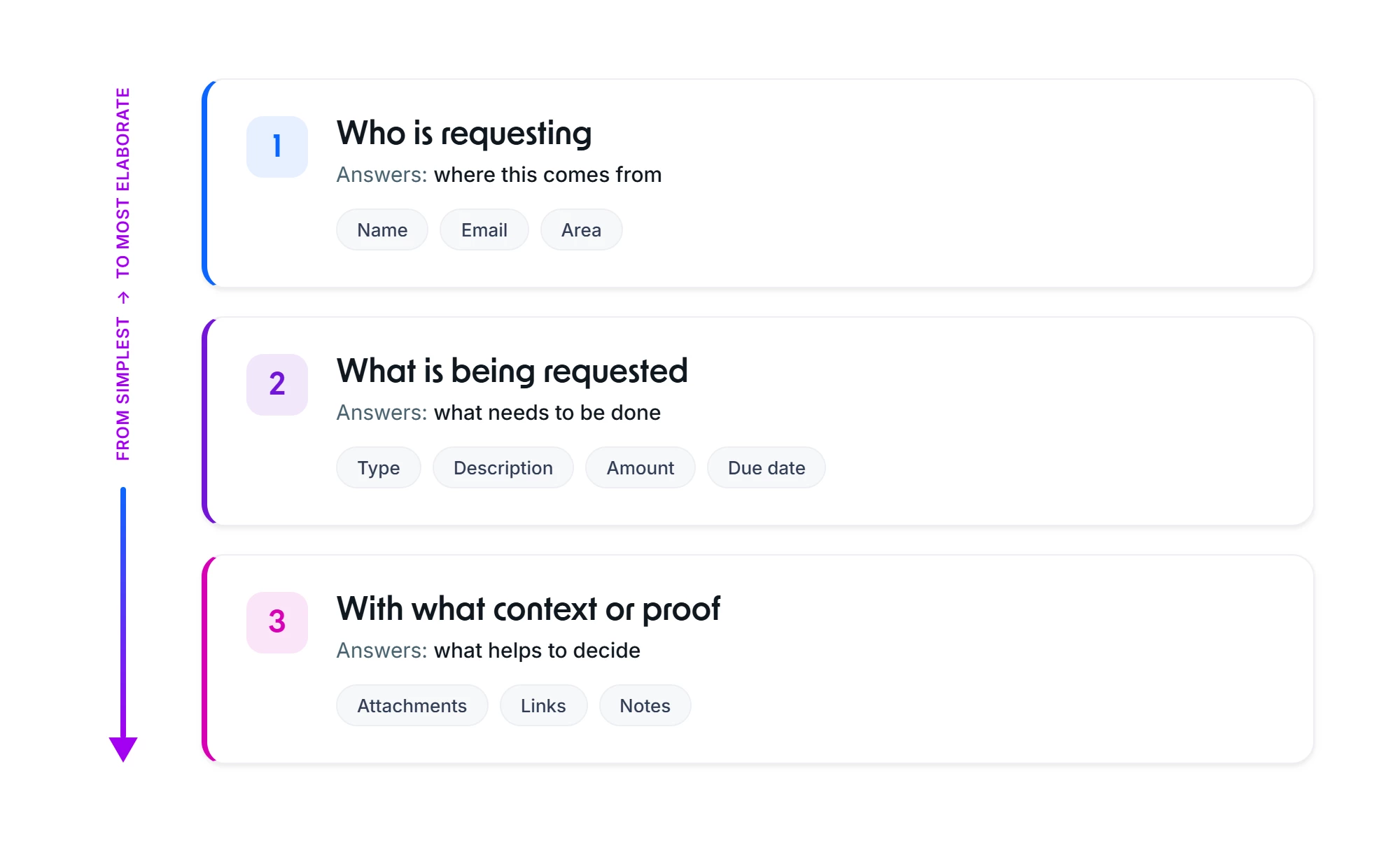
Notice that the three blocks move from the easiest to answer to what takes more thought. Whoever fills the form starts with data they already have on the tip of their tongue and only later reaches what they need to think through, and that sequence cuts down on people abandoning the form halfway. Each column of your spreadsheet fits into one of these three blocks. If one does not fit any of them, it is probably not entry data, but phase data that circled back to Decision 1.
Picture how you would fill the form if you were on the other side, receiving the request for the first time, and use that sequence as your guide when building the entry point.
What not to put in the start form
Just as important as deciding what goes in is recognizing what does not belong at the entry point. The rule comes straight from Decision 1: data that changes along the process is not entry data.
A status that evolves with each phase, an approval that only exists after the review, a completion date that has not happened yet: putting those fields in the start form creates an entry full of blanks nobody fills at the start, and pushes whoever creates the card to invent values just to move forward. That data has its place, in the phases where it is actually born. Leaving it out of the entry point keeps the form lean and true to what is known on day one.
If you notice that a field would only make sense "further down the line", that is the sign it belongs in a phase, not in the entry point.
Before you move on, make sure you understand:
- That the start form collects the data that already exists when the request comes in
- That the nature of the data, and what you will do with it later, defines the field type
- That you can look at your documented process and separate what is entry data from what belongs in a phase
