




👤 For teams building or reviewing integration flows
🔐 Available for customers with the Custom Integrations add-on
🎯 Level: beginner-intermediate
Most errors in integration flows do not happen at trigger configuration or action selection. They happen in between: when passing data from one step to the next. The right field does not appear in the selector, the data structure differs from what was expected, an optional field that was empty takes down the entire flow.
The Data Selector, which is data mapping in Pipefy Integrations, works through a Visual Mapper: you click on the field you want to fill and a selector opens showing all data available from previous steps, organized as a tree. The concept is simple, but data arriving from real APIs has structures that require specific knowledge to navigate correctly. Understanding the four patterns in this article eliminates most of the difficulties that appear when building flows.
📖 What you will understand here:
How the Data Selector works
Each step in the flow generates a set of output data. The Data Selector makes that data available to subsequent steps without requiring you to know the exact payload structure in advance. Click on any field in a step, the selector opens on the side and displays data from all previous steps organized by origin.
For data to appear in the selector, the step that generates it needs to have been tested first. The test runs the step with real data or sample data and records the response structure. Without this test, the selector does not know what that step returns and the fields remain invisible. Testing each step during flow construction is part of the development process, not an optional extra.
Use the Generate Sample Data option when the external system is not available for a real test. The generated data is sufficient to map the structure and move forward with flow construction. Before publishing, replace it with a real test to confirm that the structure matches what the system actually returns.
The four Data Mapping patterns
1. Simple objects
Most fields from an API return as direct key-value pairs: name, email, status, ID. These are the easiest to map: expand the source step in the selector, click on the desired field, and insert. The destination field receives the value.
A concrete example: an onboarding flow receives data from a Pipefy card via trigger. The next step needs to create a record in the HRIS with the employee name and start date. In the selector, expand the trigger data, locate the corresponding fields, and map them one by one to the creation step fields in the HRIS.
2. Nested objects
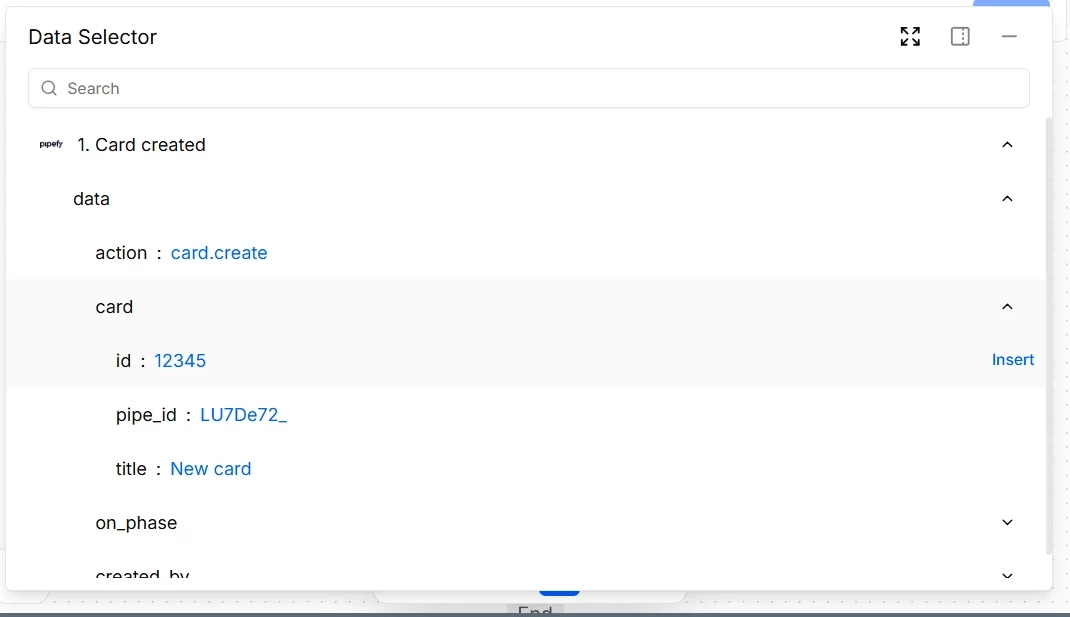
APIs rarely return completely flat data. It is common for a response to have objects inside objects: an "address" field that contains "street", "city", and "zipcode", or a "card" field that contains "id", "title", and "fields". In the Visual Mapper, these objects have an arrow that lets you expand them. Click the arrow to open the next level and continue navigating to the specific field you need.
The path taken is visible in the selector: data > card > id, for example. This path is what Pipefy uses to extract the correct value in each execution. If the API structure changes and a field moves to a different position in the hierarchy, the mapping needs to be updated.
3. Arrays
When data is a list, the selector displays items numbered in brackets: [1], [2], [3]. Each number represents a position in the list. To access the content of a specific item, expand the corresponding index and navigate through the internal fields.
The important point here is indexing. Arrays in APIs generally start at index zero or index one, depending on the implementation. Mapping the wrong index returns incorrect or empty data without generating an explicit error. Always confirm with real data which index corresponds to the item the flow needs before publishing.
Mapping a fixed index in an array that changes size between executions is a frequent source of silent bugs. If the array can have varying numbers of items, use a Loop to iterate over all elements instead of referencing a fixed position.
4. JSON Path for deep structures
Some APIs return structures too deep or too complex to navigate efficiently through the visual selector. In these cases, JSON Path allows you to access any field directly with a text expression, without having to expand each level manually.
The syntax is straightforward: data.card.fields[0].value accesses the "value" field of the first item in the "fields" array inside the "card" object inside "data". JSON Path is especially useful inside the Code action, where the data is available as a variable and the expression works natively. For visual mappings, the selector covers most scenarios with greater readability.
Handling missing data: the step nobody takes until they need it
Optional fields exist in any process. A card may be created without an assigned owner. A form may have fields that only appear with conditional logic. An API may return a field empty depending on the record state.
When a flow tries to use data that does not exist, the default behavior is to fail. Without explicit handling, the flow stops on the first execution where the optional field is empty, even if all other executions work perfectly. The correct way to handle this is to use a Router before the step that depends on the data, with a condition that verifies whether the field exists. If it exists, the flow follows the path that uses the data. If it does not exist, it follows an alternative path or ends the execution in a controlled way.
Flows tested only with happy-path cases arrive in production with bugs that only surface when data is incomplete. During development, test at least one scenario where each optional field is absent. This test reveals failure points before the production environment encounters them.
Before moving on, confirm that you understand:
☐ Why testing each step during construction is required for the data selector to work
☐ The difference between navigating nested objects, arrays, and using JSON Path
☐ Why fixed indexing in arrays is risky in production flows
☐ How a Router protects the flow from failures caused by missing data
