




👤 For teams building their first flow or reviewing existing flows
🔐 Available for customers with the Custom Integrations add-on
🎯 Level: beginner-intermediate
A flow published without adequate testing is a matter of *when* it will fail, not *whether*. The most common problem is not in trigger selection or action configuration: it is in the development cycle. Flows built all at once and tested only at the end arrive in production with broken mappings, untreated missing data, and conditional paths that were never verified.
Use AI with articles to get modeling ideas that follow best practices and respect product limits.
This article covers the four elements that make up any flow in Pipefy Integrations, the three types of triggers and when each makes sense, and the testing cycle that separates a reliable flow from one that works the first time but fails the second.
📖 What you will understand here:
The essential elements of a flow
Every integration flow is composed of the same building blocks, regardless of integration complexity.
The Trigger is the entry point: it defines the event that starts execution. Without a trigger, the flow does not run. Steps are the individual building blocks: each step is a connector that performs a specific action or communicates with an external service. Actions are the concrete operations each step executes: create a record, send an email, update a field. The Router divides the flow into different paths based on conditions: if a piece of data exists, if a value is above a threshold, if a field has a certain content.
These four elements combine in any order and depth, but the logic is always the same: the trigger starts, the steps execute actions, the Router decides which path to follow. Understanding the role of each before starting to build avoids rework in flow structuring.
When assembling steps, there is one rule that saves time, memory, and maintenance headaches: before writing code, check whether any native option in the Utility tab solves the problem. Native options are faster, more resource-efficient, and much easier to read and audit than a custom code block. Going straight to Code tends to be the most laborious and most fragile path.
The Utility tab of the flow builder contains a repertoire that covers the vast majority of data handling cases, without a single line of code:
- CSV converts CSV to JSON, JSON to CSV, and Excel (.xlsx/.xls) to CSV.
- Files Helper reads, creates, compresses (zip/unzip), checks MIME type, and changes file encoding.
- Date Helper formats dates, adds or subtracts time, calculates the difference between dates, and captures the current timestamp.
- Text Helper handles replace, split, trim, substring, case conversion, and extraction with regex.
- Math covers arithmetic operations, rounding (round/floor/ceil), max/min/absolute, and random numbers.
- Data Mapper flattens and reorganizes nested JSON payloads to simplify visual mapping.
- Data Summarizer sums, calculates average, min, max, or count of an entire list at once, without opening a loop. Crypto generates HMAC, hash, and encrypts or decrypts sensitive data.
- JSON / XML / HTML handles parse, stringify, and JSON validation; XML to JSON conversion (useful for invoice formats); and HTML to Markdown conversion.
- FTP / SFTP uploads and downloads files from corporate servers.
Error handling: do not let the flow fail blindly
No serious integration should fail silently or unpredictably. Each step provides, in the Error handling section, two controls that change flow behavior in the face of a failure.
Add Error Handler creates two branches in the step: a Success path and a Failure path. When the step fails, the flow diverts to the Failure path instead of simply interrupting execution. This allows handling the error deliberately, recording what happened, opening an exception card, notifying an owner, rather than letting the run die without a destination.
Retry on failure makes the step try up to 4 times before marking it as failed. This is the right handling for passing instabilities: a transient network error or a momentary 5xx or 429 from an external API usually resolves itself on the second or third attempt. It is worth noting that retry does not fix a request error (a 4xx will keep failing on every attempt): for those, the path is the Failure handler, not repetition.
Idempotent flows: the mandatory counterpart of retry
There is a direct consequence of enabling retry, and of any manual re-execution of a failed run: the step may run more than once with the same input. If that step creates a record, repeating the execution may create duplicates. An invoice card created in duplicate becomes a double-payment risk; a repeated record contaminates reports.
The defense is to design the flow to be idempotent: running it once or multiple times with the same input always produces the same result, without additional side effects. The pattern is simple and uses a unique key coming from the source (invoice number, order ID, transaction ID):
- Before creating, search in Pipefy for an existing record with that key (search-before-create).
- Use a Router: if it does not exist, create; if it already exists, do nothing (or update, in an upsert pattern).
- Store the unique key in a control field, so the next re-execution finds it.
This way, retry and re-execution stop being a threat and become a safety net: the flow recovers from transient failures without ever duplicating data.
Use case: contract approval integration
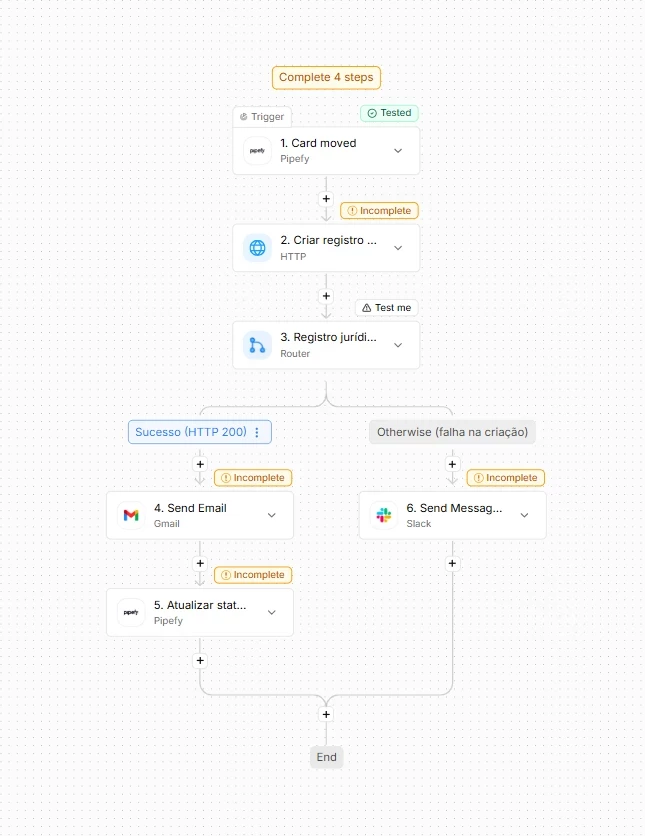
A contract approval process in Pipefy needs, when a card advances to the "Approved" phase, to create a record in the external legal system, notify the requester by email, and update a status field in the original card.
The flow structure: event trigger (card moved to the "Approved" phase), one HTTP step to create a record in the legal system, a Router that verifies whether the creation succeeded (status 200) or failed, and two paths: on the success path, an email step and a card update step; on the failure path, a notification step for the operations team to investigate.
This flow has five steps beyond the trigger. Building and testing everything at the end means any problem in the second step only surfaces after five configurations are done. The correct cycle is to test each step before adding the next.
The testing cycle that avoids rework
Pipefy Integrations does not allow using the output data of a step in subsequent steps until that step has been tested. This is not a limitation: it is a safeguard. An untested step has no known data structure, and mapping fields from an unknown structure generates mappings that break on the first real execution.
The correct cycle is iterative: configure the trigger, test it, review the output data in the side panel. Add the first action step, configure it using the trigger data, test it. Review the output data. Only then add the second step. Repeat through the last step. Run Test Flow to verify the complete flow in sequence. Only then publish.
Test Action runs the action in the real system: it creates a real card, sends a real email, creates a real record. Use test data with names and values clearly identifiable as test data to avoid polluting the production environment with data generated during development.
Runs: the history that enables diagnosis
Every flow execution generates a run. The Executions tab shows the complete history: successful executions, failures, and partially completed executions. Each listed execution details the data that passed between steps and the exact error that caused the failure, when there is one. This history is the starting point for any production diagnosis.
Retry: two options with distinct purposes
When an execution fails, two retry options are available. Retry from Failed Step resumes execution from the exact step where the failure occurred, using the same data from the original execution and the same flow version. This is the correct option for transient failures: API timeout, network instability, momentary unavailability of an external system. The flow was already correct; the problem was external and temporary.
Retry on Latest Version creates a completely new execution and runs the flow from the beginning, using the current published version. This is the correct option after fixing a bug or updating the flow logic. The original execution failed due to a problem in the flow; the new version resolves it; the retry reprocesses with the corrected logic.
Using Retry on Latest Version on a run that failed due to a transient error, when no change was made to the flow, creates a duplicate run that may generate inconsistent data in the destination system: two records created, two emails sent, two updates applied. Choose the retry type based on the cause of the failure, not the urgency to resolve.
Before moving on, confirm that you understand:
☐ The elements of a flow and the role of each
☐ Why Pipefy blocks use of data from an untested step
☐ The difference between Retry from Failed Step and Retry on Latest Version
