





Overview
Map is a new way to see how a pipe connects to the rest of your Pipefy environment. Open any pipe, click the Map tab, and instantly see everything it influences and is influenced by: other pipes, databases, connection types, and how many connections exist, all laid out in one clear, navigable picture.
What's new?
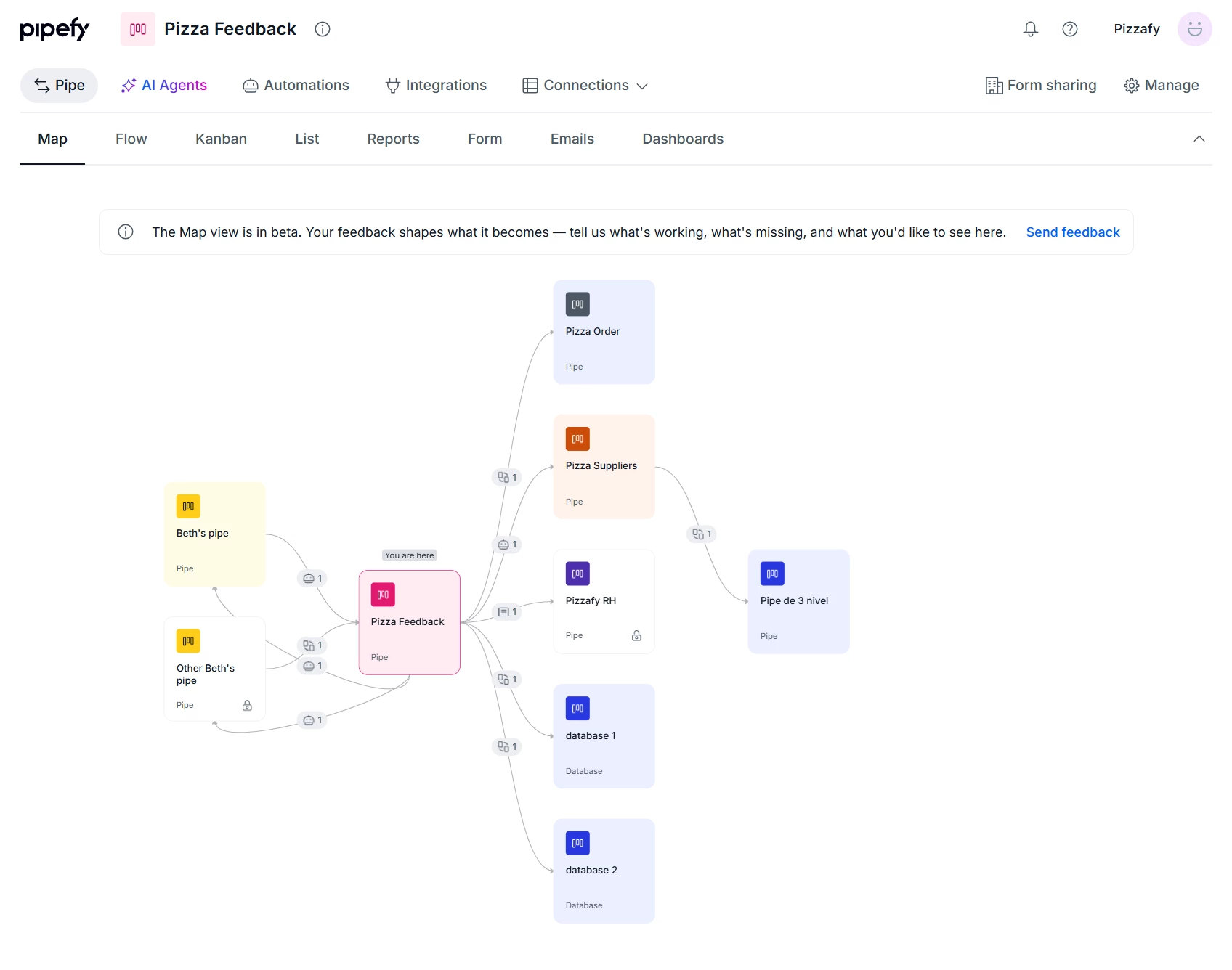
- New Map tab, available right next to the Flow tab on any pipe.
- A visualization with the open pipe at the center and everything it connects to around it.
- Connection types and counts, showing not just what connects but how.
- No setup required: just open the pipe and click Map.
How does this help?
- Faster audits: understand in seconds what a pipe sends, receives, and triggers, without opening process after process.
- Easier onboarding: when you inherit a process someone else built, you see its dependencies before making any change.
- Safer change decisions: before editing a field or automation, you see exactly which pipes and databases would be affected.
Use cases
1. A process architect reviewing an inherited pipe. Taking over a purchase approval process built by someone else, the architect opens the Map tab and finds the pipe connected to three vendor databases and a contracts pipe. Before touching the phase movement automation, they already know which connections need validating.
2. Auditing a process before a scope change. An operations team needs to migrate a reimbursement process to a new structure. Using Map, they identify every inbound and outbound connection on the current pipe, including automations updating a cost center database, and use that map as a migration checklist.
3. Investigating unexpected behavior on a pipe. A card keeps getting updated by an automation coming from another process, but no one on the team knows which one. With Map, the person responsible quickly identifies which pipe is sending that update and what type of connection is involved, without manually opening every related process.
4. Planning an expansion for a process with multiple internal integrations. Before adding a new automation that creates a connected record, the Pipe Admin checks Map to confirm the destination database isn't already being fed by a competing source, avoiding data conflicts.
Most relevant for
- Pipe Admins
- Process architects
- Operations teams
- Consultants and integrators taking over existing processes
