
We're excited to announce some enhancements we've implemented in the Admin Panel to elevate the Admin experience even further!
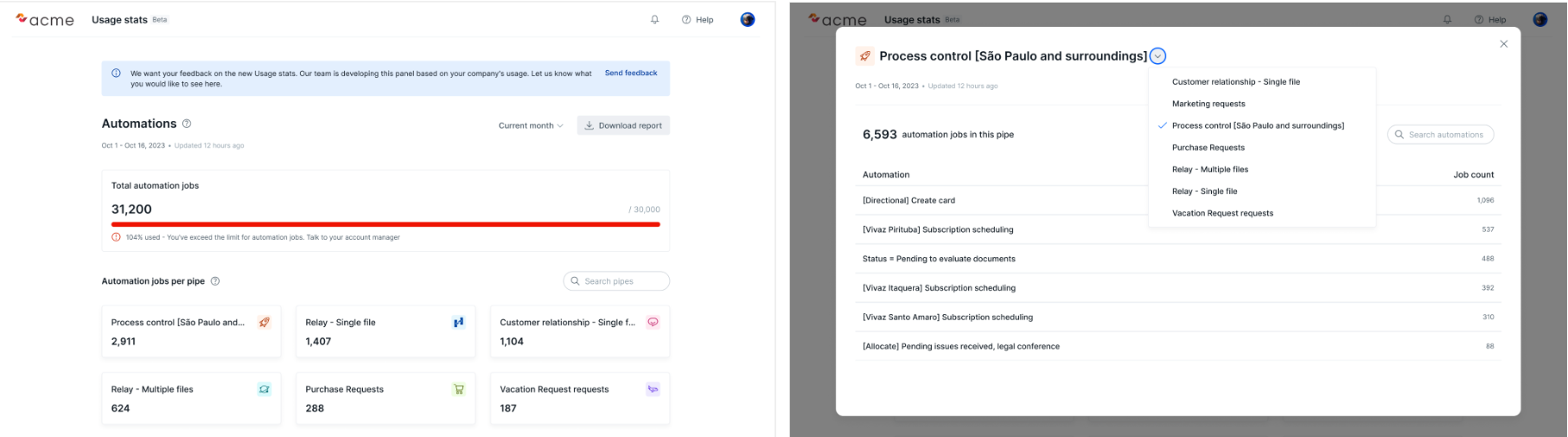
We've introduced a new feature where you can now access automation details directly from the product. With just a simple click on the card associated with a Pipe, you'll be able to view the Automation name and the corresponding job count per Automation. Isn't that incredible?🤩
How does it work?
Simply head to the home menu to access the usage stats area. Once there, you can:
⭐Export the Automation jobs report to your e-mail
⭐Utilize filters: Current month, Last month, and last three months
⭐Provide feedback on what you'd like to see in the Admin panel in the future
⭐See the Automation jobs distributed per Pipe
⭐Progress bar showing the comparison of Automation jobs contract x Automation used
⭐See Automation jobs details 🆕
👉🏼Take the opportunity to read more about this feature in our help center:
🎓 Usage Stats - EN
Your feedback are welcome!😉