



Overview
The Agent Builder now lets you duplicate an existing agent with a single click. The copy preserves all original configurations, including instructions, context, and behavior settings, and is created as disabled by default so you can make adjustments before activating it.
What's new?
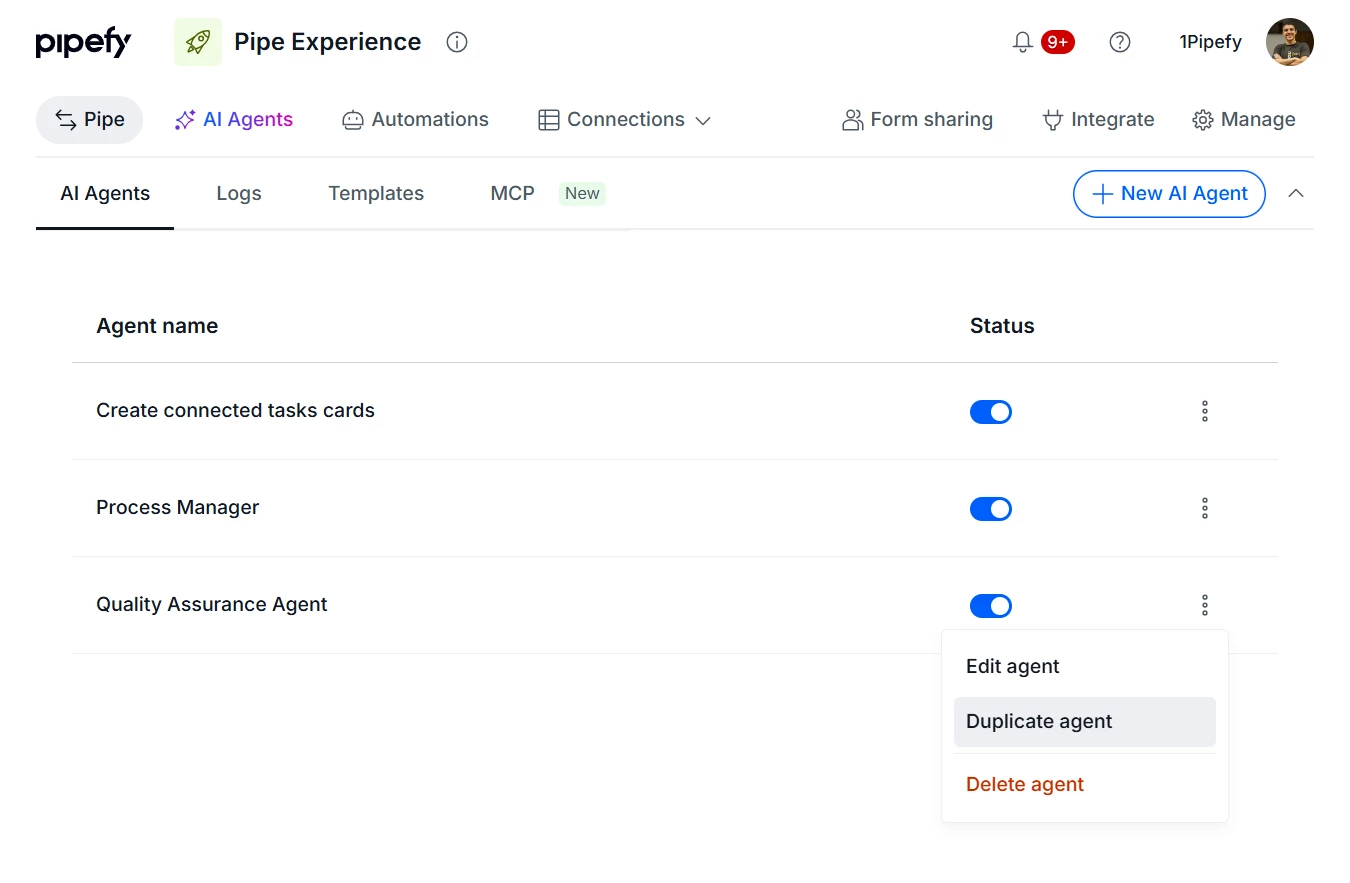
- Duplicate Agent action: available directly in the agent list.
- Instant cloning: copies instructions, context, and behavior configurations from the original agent. The new agent is disabled by default.
How does this help?
- Eliminates rework when building similar agents. When you need multiple agents that share a common foundation, there is no need to reconfigure everything from scratch.
- Speeds up variations and A/B testing. Duplicate a working agent, adjust only what changes, and compare behaviors without touching the original.
- Reduces the risk of errors from manual reconfiguration. Complex, lengthy instructions no longer need to be copied and pasted by hand, which cuts inconsistencies between agents.
- Keeps the original agent intact. The clone starts as disabled, so agents in production are not affected while you adjust the copy.
Use cases
1. Support triage agent split by language
An operations team maintains a support ticket triage agent configured with categorization instructions, SLAs by incident type, and automatic escalation rules. To serve users in English and Spanish, the admin duplicates the agent, updates only the language of the instructions, and activates the copy. Both agents run in parallel with the same triage logic, with no risk of divergence in categorization rules.
2. Onboarding agent per product line
A SaaS company runs an onboarding agent configured to guide new users through the main product. With the launch of a second product, the admin duplicates the agent, replaces the product context and initial setup steps, and activates the new version. The base onboarding flow, including welcome messages and engagement checkpoints, is fully reused.
3. Purchase approval agent with different thresholds per department
The Procurement team configures a requisition approval agent with authorization rules, required fields, and notification messages. To adapt the flow to departments with different approval limits (IT, Marketing, and Operations), the admin duplicates the agent three times and adjusts only the approval threshold field in each copy. All three versions share the same approval structure without rebuilding the flow from scratch.
4. Evidence collection agent for audit by process type
A governance team runs an agent that collects evidence and generates compliance reports for financial processes. To expand coverage to HR processes, the admin duplicates the agent, updates the collected fields and applicable compliance criteria, and activates the new version. The collection, consolidation, and report generation structure is fully reused.
5. Lead qualification agent with criteria by segment
The Revenue Operations team maintains a lead qualification agent configured for the Enterprise segment. To create a version for the Mid-Market segment with different scoring criteria and qualification questions, the admin duplicates the agent, updates the scoring rules and screening questions, and activates the copy. The CRM integration flow and sales team notifications remain identical.
Most relevant for
- Agent Builder admins
- Operations teams managing multiple active agents
- Process managers maintaining flow variations by area or segment
- IT teams responsible for governance of agents in production
