



Overview
To provide greater transparency and simplify AI process debugging, Agent Logs now display the agent's detailed reasoning directly within the tracing UI.
This update allows you to see not just the final outcome, but the entire thought process and logic behind every action taken by the agent.
What’s new?
Previously, logs only showed action inputs and outputs.
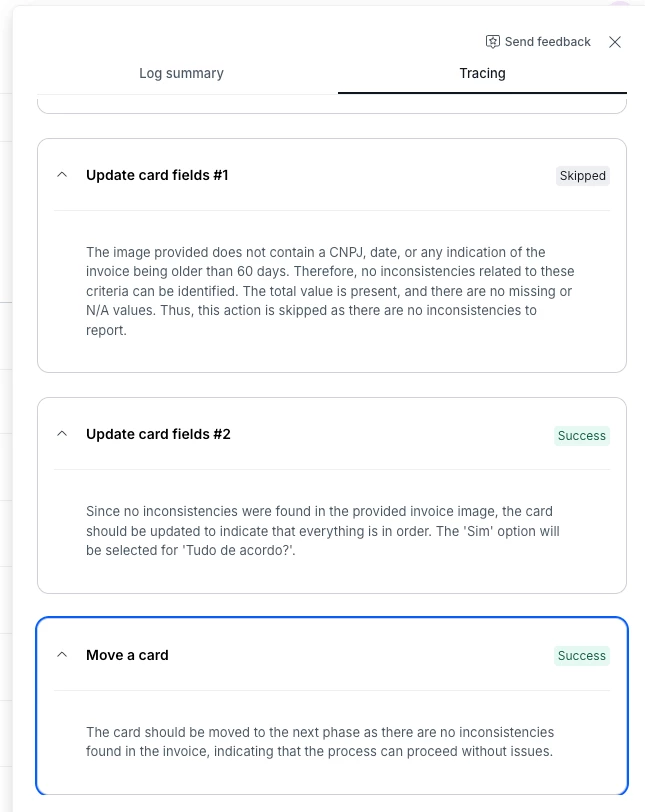
With this version:
- The AI Agent’s "thought process" is now visible in the Agent Logs UI (V1).
- Audit why an agent made a specific decision or followed a certain path within the workflow.
How it helps
- Quickly identify if an agent misinterpreted an instruction or a specific data point.
- Use the reasoning visibility to fine-tune instructions (prompts) and improve agent accuracy.
- Provides a clear trail of how AI is operating under your company’s business rules.
Availability and Rollout
- Availability: this feature is now being rolled out to all users.
- Important: this feature is not retroactive; detailed reasoning will only be available for executions occurring after the release.
Most relevant for
- Pipe Admins
- Developers
- AI and Process Analysts
