



Overview
The Agent Builder now includes a per-behavior configuration panel that consolidates model and capability decisions in one place. Pipe Admins can define which language model and which skills are active directly within each behavior, without relying on global settings that apply uniformly across all agent flows.
What's new?
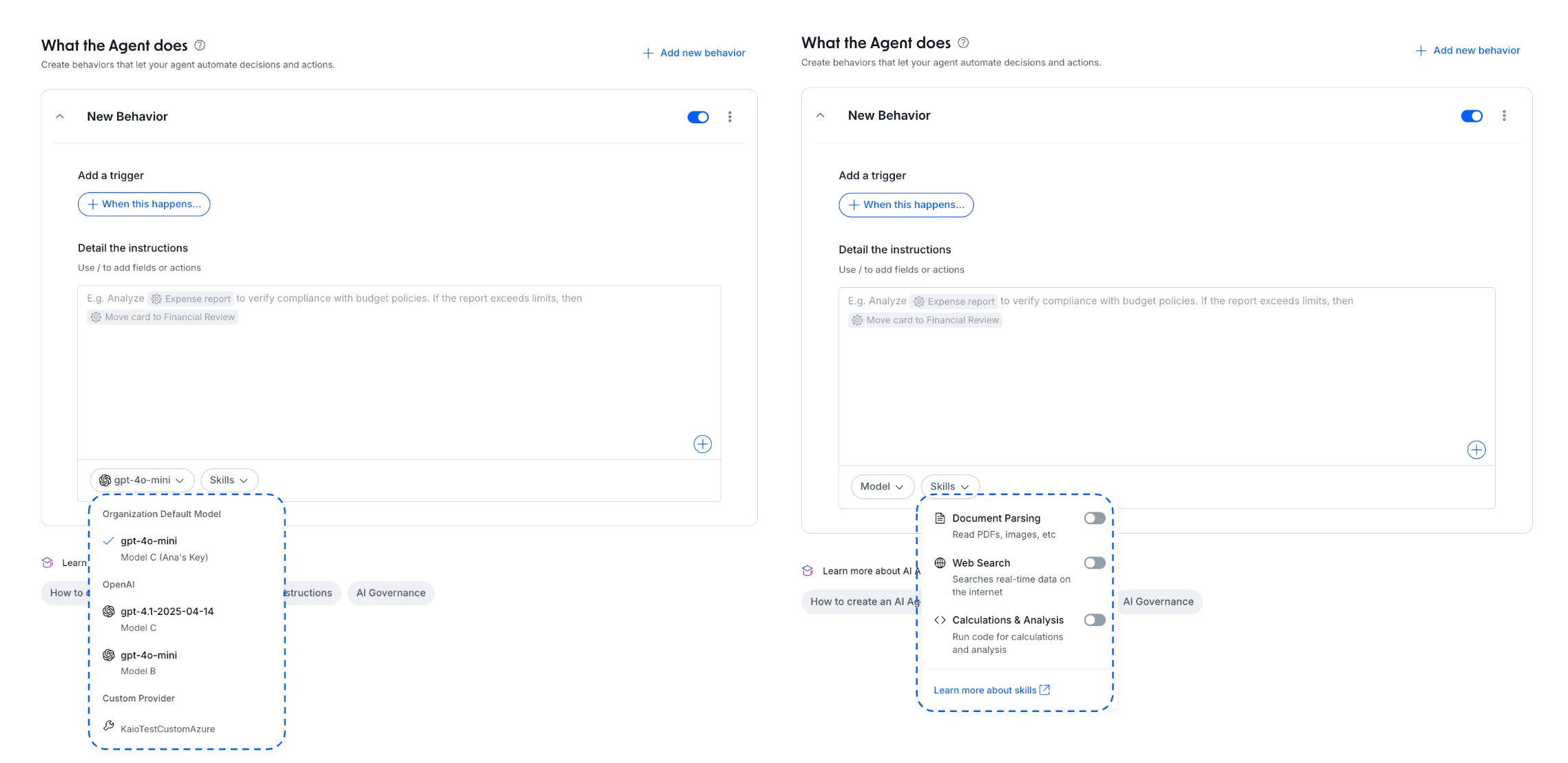
- Per-behavior model selection: if your organization has more than one LLM configured, you can now choose which model to use within each behavior, directly from the configuration panel.
- Per-behavior skills management: a new Skills dropdown lets you enable or disable specific capabilities (such as IDP, Web Search, or Calculations and Analysis) for each individual behavior.
How does this help?
- Fine-grained control per behavior: each agent behavior can use the model and skills that fit that specific flow, without affecting others.
- Reduced unnecessary consumption: skills that are not needed in a behavior stay disabled, preventing unintended use of capabilities and credits.
- Configuration within IT-approved boundaries: the models available in the Agent Builder are pre-configured by IT — Pipe Admins choose from approved options and enable skills directly within each behavior, without requiring new technical intervention for every adjustment.
- Coherence between behaviors and processes: agents that operate across multiple flows can have distinct profiles in each one, aligning capability to operational context.
Use cases
1. Incident triage agent with differentiated models by severity
An ITSM agent has two behaviors: initial triage and critical incident analysis. The triage behavior uses a lighter model (lower latency, lower cost) with Web Search enabled to query an external knowledge base. The critical analysis behavior uses a more powerful model with Calculations and Analysis activated to correlate impact metrics. Each flow runs at the appropriate capability level, without burdening the simpler behavior with a heavy model.
2. Procurement agent with separation between drafting and validation
A Procurement agent has one behavior for generating purchase order drafts and another for validating compliance with internal policy. The drafting behavior uses a lightweight model with no additional skills. The validation behavior activates IDP to extract data from supplier documents and Calculations and Analysis to check approval thresholds by spend category. The separation prevents the drafting behavior from accessing unnecessary capabilities and ensures the validation step is not running on an undersized model.
3. HR agent with contextual skills per process stage
A new employee onboarding agent has distinct behaviors for each stage: document collection, compliance check, and manager communication. The collection behavior activates IDP to process contracts and submitted documents. The compliance behavior uses Calculations and Analysis to verify legal deadlines and dossier completeness. The communication behavior uses text generation only, with no additional skills. The result is a cohesive agent that does not apply document-processing capability where only an email needs to be written.
4. Customer success agent with churn risk analysis per behavior
A Customer Success agent operates with two behaviors: support request handling and proactive account health analysis. The support behavior uses a compact model with no additional skills to answer operational questions. The analysis behavior activates Calculations and Analysis to cross-reference usage data, ticket volume, and SLA breaches, generating a risk score before routing to the CS team. The setup prevents heavy analysis from running on every support interaction, reserving capacity for moments that require a decision.
Most relevant for
- Pipe Admins
- Builders working with multi-step agent flows
- Operations teams managing high-variability processes
- IT teams responsible for AI governance and model access
Documentation
To understand what each skill does and how to configure them, check the Agent Skills articles in the Help Center.
