




Overview
Admins and Super Admins can now set every new pipe created in the organization to be private by default. The toggle lives under Organization Settings > General Settings and takes effect immediately for new pipes — no manual adjustment needed at creation time.
What's new?
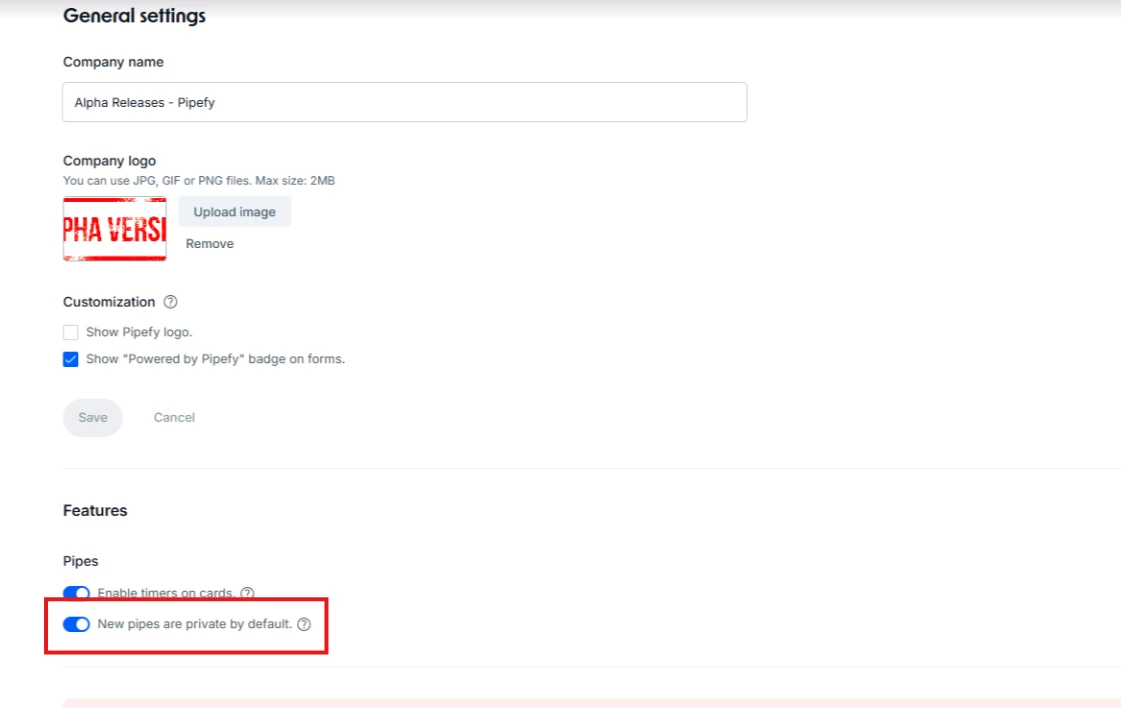
- New toggle in General Settings (visible to Admins and Super Admins only)
- Every pipe created from scratch or cloned from the Template Store defaults to "Private to invited members"
- Organization members can see the pipe exists in the list but cannot access it without an invite
- Internal cloning respects the original pipe's existing permission settings
- Previously created pipes are not affected when the toggle is activated
How does this help?
- Eliminates accidental exposure of sensitive data at the moment of pipe creation — the most common human error in high-volume environments
- Moves privacy control to the organizational layer, removing reliance on individual judgment at creation time
- Reduces compliance risk surface for operations handling regulated data (HR, Finance, Legal, Procurement)
- Accelerates IT and Security sign-off for internal Pipefy expansion by addressing governance objections before they stall rollout
Use cases
- Onboarding a new department with sensitive data: An HR team starts building pipes for hiring and offboarding workflows. With the toggle on, no pipe is born exposed to the entire organization — access is granted only to the right members from the start.
- Multi-BU expansion with data isolation: A company with multiple business units activates the toggle to ensure that a Procurement pipe from one BU isn't accidentally visible to collaborators in another area due to an oversight during creation.
- Regulated environment (SOC 2, ISO 27001, GDPR): An organization under audit needs to demonstrate that pipes handling personal or financial data were never exposed by default. The toggle serves as a documentable security-by-design control.
- Managing multiple admins in a large organization: In organizations with dozens of admins and hundreds of users creating pipes, the toggle centralizes the privacy baseline — without relying on individual training or checklists.
- Template Store usage at scale: Teams cloning templates to spin up new processes automatically receive private pipes, with no risk of exposing process structures or configuration data to users outside the workflow.
Most relevant for
- Admins and Super Admins responsible for IT governance
- Operations leaders in organizations handling regulated data
- Security and compliance teams evaluating Pipefy expansion
- Procurement, HR, or Finance managers with data isolation requirements
Plans and availability
Available for all organizations. Activated via Organization Settings > General Settings (access restricted to Admins and Super Admins).
