




Overview
Map now recognizes a new connection type: AI Agents. It maps the connections your AI Agents create between pipes and databases, bringing agent activity into the process view.
What's new?
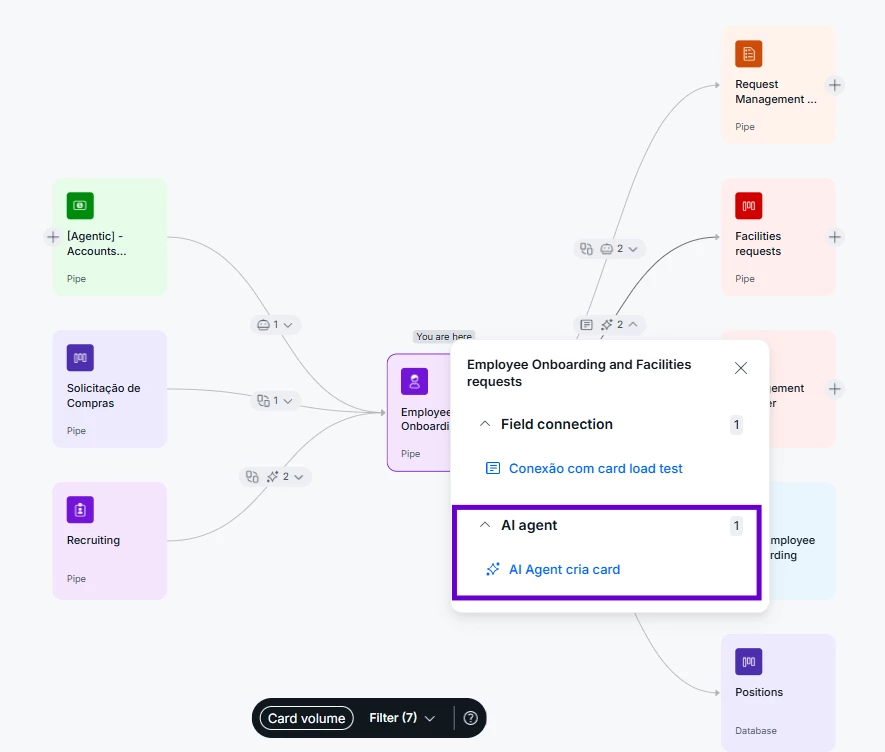
- AI Agents on the map: when an AI Agent creates cards in another pipe or database, that connection now appears as its own type, visually distinct from the rest.
- A more complete picture: alongside connections, automations, field connections and integrations, AI Agents round out the full view of how a pipe connects.
- Filter for agents only: the connection type filter now includes AI Agents, so you can isolate them when needed.
- Nothing to set up: AI Agent connections show automatically for any pipe that already has them.
How does this help?
- Full visibility into AI driven automation: you see exactly where an AI Agent is creating cards in other pipes or databases, without having to infer it from manual automations.
- Faster dependency diagnosis: isolating the AI Agents filter lets you quickly spot which processes rely on automated orchestration, making audits and architecture reviews easier.
- A living process map: Map now reflects the real state of the process, including the AI layer, serving as a reliable reference for new team members or modeling reviews.
Use cases
A ticket triage agent works inside a Service Desk pipe.
When it reads the ticket description and identifies that the issue is tied to a specific asset, it automatically creates a connected card in an Asset Management pipe. On Map, that link now stands out as an AI Agent connection, letting the process admin immediately see the connection didn't come from a traditional automation. This removes the need to open every automation manually just to confirm where the link between the two pipes came from.
A lead qualification agent runs inside a Sales pipe.
When it identifies that a lead matches ICP criteria, it creates a matching record in a Strategic Accounts database. With the new view, the RevOps team can see directly on Map how many parts of the funnel depend on this automated triage, without having to interview the sales team about how the flow works.
A financial reconciliation agent monitors an Accounts Payable pipe.
It reads invoice attachments and, when it finds a value mismatch, creates a connected card in an Audit pipe. On Map, the Pipe Admin filters for AI Agent connections only and confirms, ahead of a compliance audit, exactly which pipes receive AI created data, without reviewing automation by automation.
An onboarding agent works inside a Customer Success pipe.
When it identifies that a customer has crossed a usage threshold, it creates a card in an Upsell pipe. Opening Map, the CS team can visually tell this trigger came from an AI Agent rather than a manual report, speeding up validation of why each opportunity was generated.
Most relevant for
- Pipe Admins
- Process architects
- RevOps teams
- Operations leaders
Plans and availability
This feature is rolling out gradually across Pipefy accounts.
