



Overview
Pipefy AI Agents now connect to the broader AI ecosystem through the Model Context Protocol (MCP).
With the simultaneous launch of the MCP Client and MCP Server, your Agents can call external tools directly from within their configured workflows, and Pipefy processes can be exposed as tools to third-party AI interfaces.
The practical outcome: complex cross-system workflows that previously required manual coordination between platforms can now be executed entirely through natural language, with governance and traceability kept inside Pipefy.
What's new?
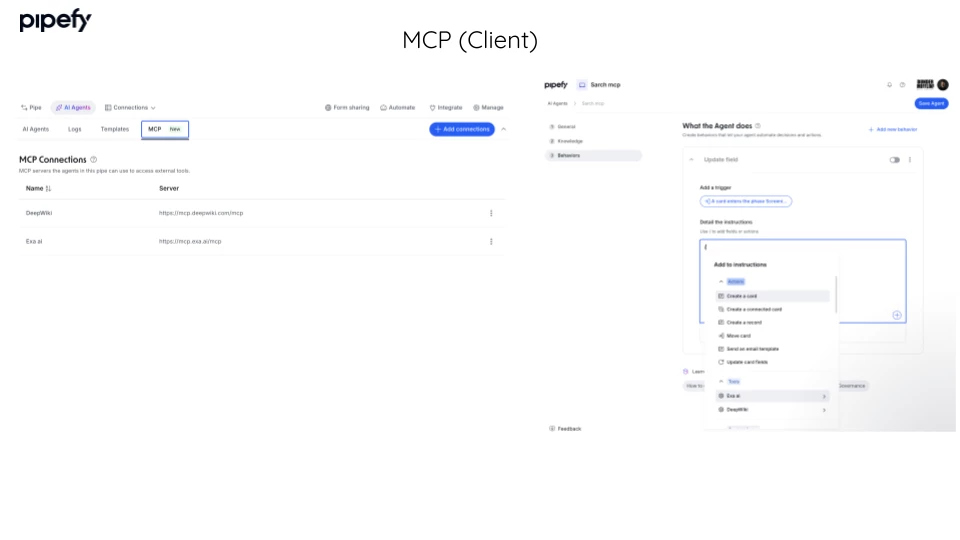
- MCP Client: enables your AI Agents to call external tools (such as Slack, Salesforce, and others) directly from within workflow behaviors configured in Pipefy, without leaving the platform.
- MCP Server: exposes Pipefy processes as tools that MCP-compatible AI interfaces (such as Claude Code, Cursor, and similar) can access and execute through natural language.
How does this help?
- Eliminates silos between critical systems: your Agents can now query and update data in Salesforce, Slack, and other tools without human intervention, connecting what was previously fragmented across platforms.
- Reduces coordination costs in cross-system workflows: flows that relied on manual handoffs or team escalations now happen in an orchestrated way within the Agent itself.
- Opens Pipefy to the AI ecosystem: technical teams using AI-powered development environments (such as Cursor or Claude Code) can interact with Pipefy processes directly through natural language, without opening the interface.
- Keeps governance centralized: every cross-system execution remains traceable and controlled inside Pipefy, combining operational autonomy with full visibility for IT and process owners.
Use cases
1. Incident triage Agent with automatic Salesforce update An Agent configured for IT incident triage receives a ticket submitted through a Pipefy form. Via the MCP Client, the Agent queries the customer's history directly in Salesforce, identifies the active contract and the matching SLA queue, and updates the priority field in the CRM with no manual action required. The support team sees the update synchronized across both systems in real time, eliminating the need to switch between platforms.
2. Purchase approval Agent with contextualized Slack notification A procurement Agent receives a purchase request above the configured approval threshold. Instead of escalating by email, the Agent uses the MCP Client to send a direct Slack message to the responsible manager with the full context of the request (vendor, amount, justification, and cost center), waits for a response, and automatically updates the card status. The approval process happens without the approver ever needing to open Pipefy.
3. Running internal processes via Claude Code or Cursor A developer or operations analyst uses Claude Code with the Pipefy MCP Server configured. They type in natural language "open an access request for new employee João Silva in the Engineering department" and the Agent creates the card, fills in the fields, and triggers the approval workflow in Pipefy directly from the development environment, without opening a browser.
4. Vendor onboarding Agent with external data enrichment During the onboarding flow for a new vendor, an Agent accesses an external CNPJ validation API and a compliance database via the MCP Client, cross-references the data with the fields in the Pipefy form, and automatically flags any discrepancies that require human review. The procurement team only receives the cases that actually need attention, without manually processing every registration.
5. Employee offboarding orchestration across HR and IT An offboarding Agent receives an employee exit card and, via the MCP Client, triggers access revocation in the company identity system (e.g., Okta), notifies the IT channel in Slack with the list of licenses to release, and automatically creates a hardware return ticket. The entire cross-system flow is executed from a single trigger in Pipefy, with full traceability of every action taken.
Most relevant for
- Builders and AI Agent administrators in Pipefy
- Operations teams with workflows that span multiple systems
- IT teams responsible for automation governance
- Developers and technical analysts using AI environments (Claude Code, Cursor)
- Process owners in Procurement, HR, and ITSM
Documentation
Technical documentation will be published soon on the developer portal. The MCP Server open source repository is already accessible on GitHub.
