




Overview
Pipefy Integrations receives a set of improvements that expand operational visibility, broaden enterprise connectivity, and increase execution reliability. The new queue status dashboard lets you track what is being processed, completed, and waiting in real time. The native Azure AD connector arrives for teams that need to integrate identity provisioning and access management directly into their workflows. And improvements to the background engine ensure faster, more reliable executions across the board.
What's new?
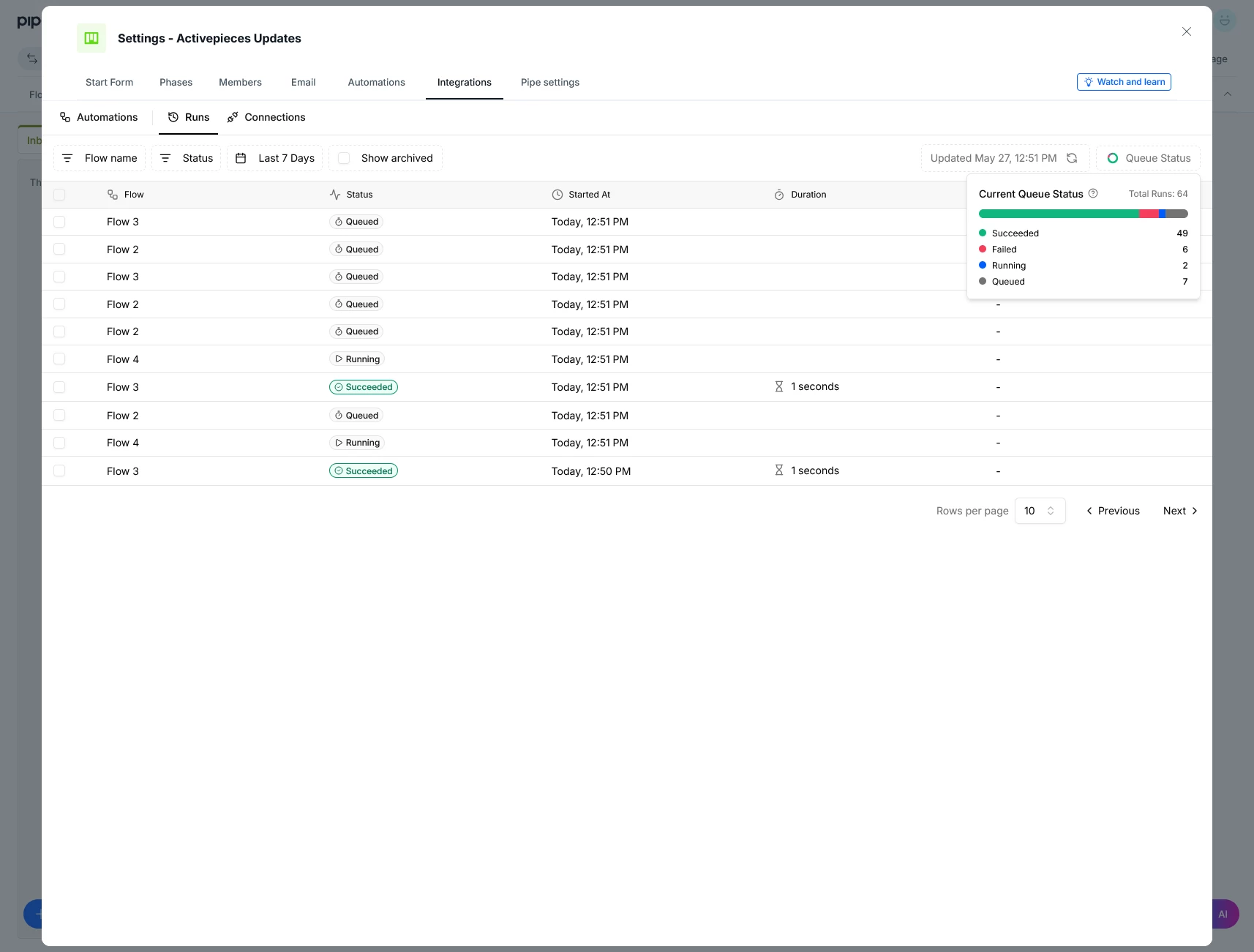
- Real-time queue status dashboard: the Flow Runs panel now shows interactive live metrics for Total Runs, Succeeded, and Failed executions. Available at Pipefy Integrations > Flow Runs.
- "Queued" status: when the volume of simultaneous executions reaches the company capacity, excess flows are automatically marked as Queued and processed in order as slots free up. No executions are dropped during volume spikes.
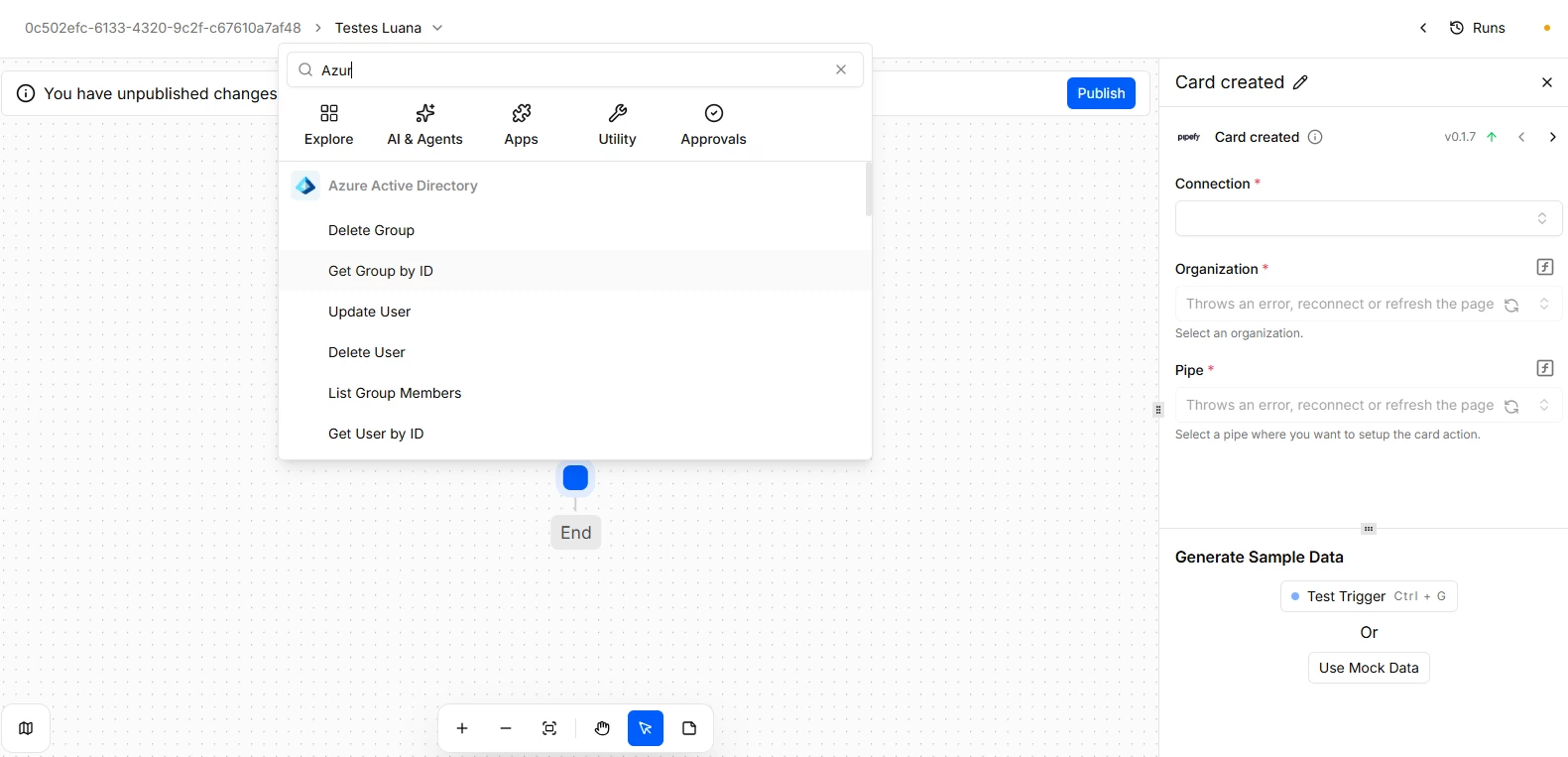
- Native Azure AD connector: a new connector available in Pipefy Integrations for direct integration with Azure Active Directory. Supports account provisioning, access management, and automated employee data synchronization across connected systems.
- Background engine performance improvements: internal optimizations that reduce flow startup time and automatically handle stalled or frozen integrations, freeing up resources without manual intervention.
- Updates to existing connectors: Microsoft Teams, Gmail, ServiceNow, Slack, Baserow, Mixmax, and Amazon S3 received new actions and behavior fixes for greater stability and broader use case coverage.
How does this help?
- Immediate failure diagnosis: with live metrics on the dashboard, you spot queue issues the moment they happen, without relying on retroactive logs or opening support tickets.
- No executions lost during volume spikes: the Queued status ensures flows triggered during high-demand periods are processed automatically, preserving the integrity of critical processes like bulk imports and cascading notifications.
- Enterprise Azure AD integration without manual setup: the native connector eliminates the need for custom recipes to connect Pipefy to the corporate identity directory, reducing setup time and misconfiguration risk.
- Faster, bottleneck-free executions: the optimized engine starts flows with less overhead and automatically clears stalled tasks, keeping the queue moving even under heavy load.
Use cases
1. Monitoring bulk imports for the Operations team
The Operations team runs monthly data imports that trigger hundreds of simultaneous executions in Pipefy Integrations. With the real-time queue panel, the responsible analyst tracks live how many executions have completed, failed, or are waiting, without having to wait for the full process to finish before spotting errors. Flows that exceed the simultaneous execution limit automatically enter Queued status and resume in the right order, with no manual intervention required.
Most relevant for
- Operations teams managing high-volume integrations
- Builders and admins responsible for monitoring executions in Pipefy Integrations
- IT teams managing identity and provisioning with Azure Active Directory
- Managers of critical processes that depend on real-time notifications and synchronization
