




Overview
The Usage Stats panel now includes a dedicated column showing each pipe's visibility status, giving organization admins a centralized way to identify which pipes are configured as public or private.
What's new?
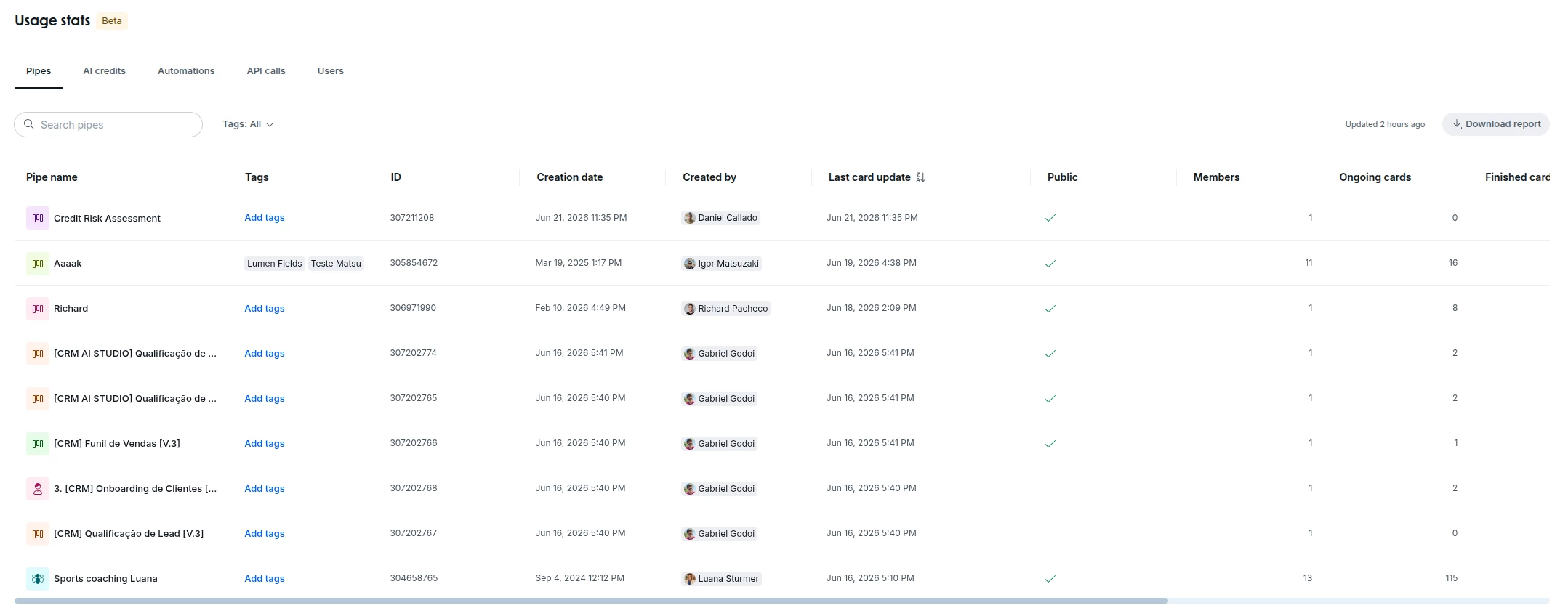
- New Public column available in the Usage Stats table, found under Organization Admin > Usage Stats
- Values displayed as Yes (public pipe) or No (private pipe) for each listed pipe
- The column supports sorting, allowing admins to quickly group and identify all public or private pipes
- The feature is read-only: it provides full visibility without modifying any existing permissions
How does this help?
- Centralized visibility audit: admins can see the status of every pipe on a single screen, with no need to open each pipe separately.
- Faster security reviews: sorting by visibility eliminates manual pipe-by-pipe inspection during audit or compliance cycles.
- Ongoing governance for legacy processes: pipes created before the default privacy setting was configured are now surfaced in the audit view, closing a gap that previously blocked full visibility governance across the organization.
- Direct complement to the default privacy control: used alongside the Default Privacy for Pipes feature, the column covers both new and existing pipes, completing the governance picture end to end.
Most relevant for
- Organization administrators in Pipefy
- IT and security teams responsible for process governance
- Companies with compliance requirements and periodic audit cycles
