




More intelligence in your Agents, more governance in your environment, more confidence to buil.
July consolidates Pipefy as an AI-guided orchestration platform grounded in governance. AI Agents gain per-behavior models, advanced reasoning for complex documents, and the option to run on the models your company already uses, while the builder now delivers processes far closer to running. At the same time, your environment becomes more transparent and auditable, from the card to the API, and testing before publishing becomes a natural part of how you build.
All launches:
Company Overview: consumption governance down to the pipe level
Company Overview brings together, in a single surface, everything IT admins need to track process health, automation performance, and API consumption across the whole operation. This month’s evolution deepens the data and opens direct action channels, so governance decisions get made with full context instead of isolated snapshots.
What’s new:
- Pipe-level charts inside Automations: drill down from org-level health into each pipe to track volume and bottlenecks process by process.
- API report export: download the API consumption report in one click, ready for auditing or external analysis.
- Native feedback in Usage Stats: send suggestions or report issues right from the screen where the behavior happens, with no separate ticket.
Pipe Audit Logs: full structured metadata now available via API
Pipe Audit Logs now deliver complete structured metadata via API and CSV export. Every event includes fields like Timestamp, Object Type, Object ID, Event Name, Actor ID, and old and new values, at the granularity that compliance, SIEM, BI, and AI Agent workflows require to operate without manual intervention.
What’s new:
- Full structured metadata via API and CSV export, including Timestamp, Object Type, Object ID, Event Name, Actor ID, Old Value, and New Value.
- Standardized table format, ready for direct ingestion into external tools with no manual transformation.
- CSV export via the UI, with the same structure available through the API.
Map: see everything your pipe connects to
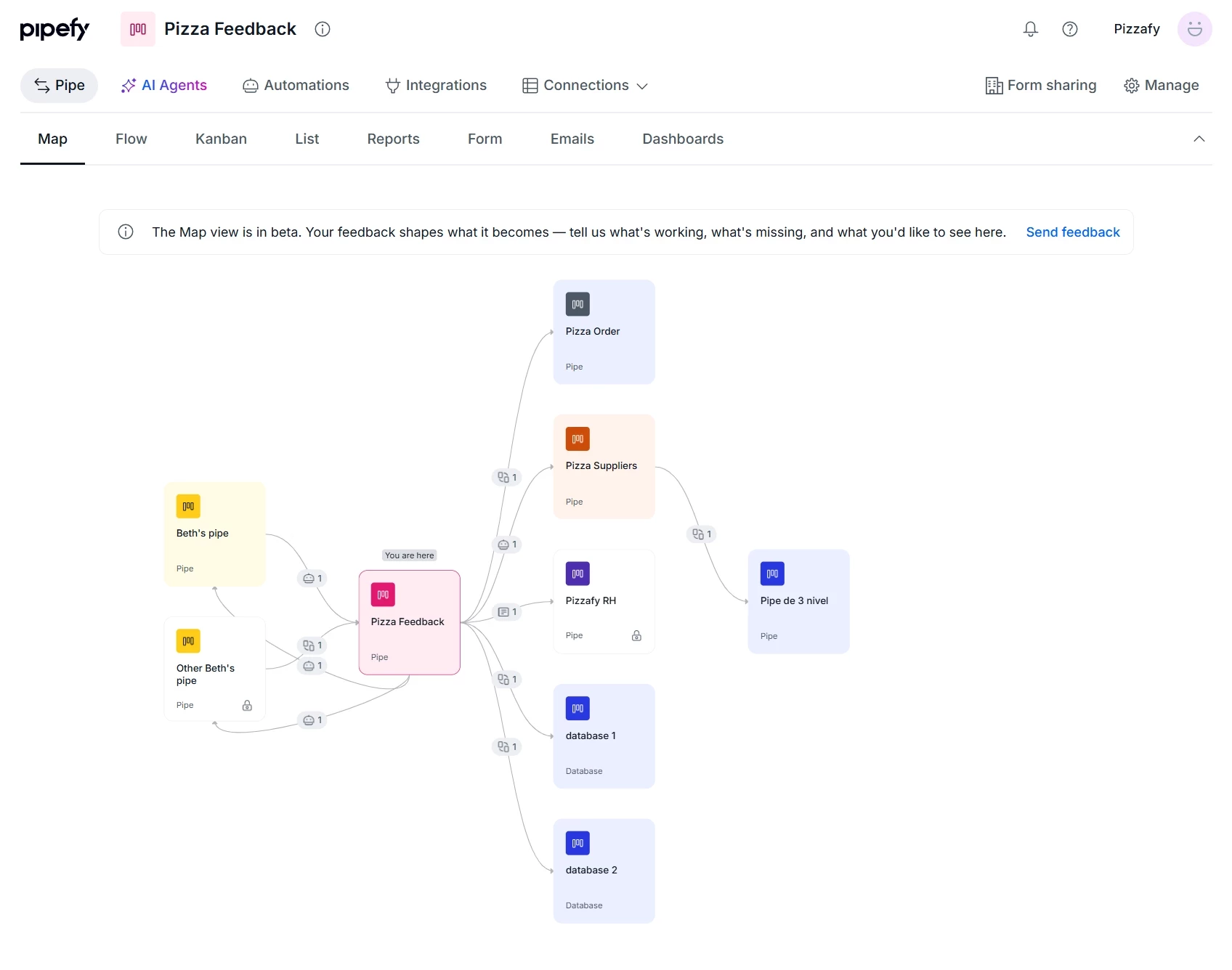
Map is a new way to see how a pipe connects to the rest of your Pipefy environment. Open any pipe, click the Map tab, and see in one screen everything it influences and is influenced by: other pipes, databases, connection types, and connection counts.
What’s new:
- New Map tab, available next to the Flow tab on any pipe.
- Centered visualization: the open pipe at the center with all its connections around it.
- Connection types and counts between the pipe and each connected element, with no setup required.
AI Agent Logs: selected row highlight
When you open the detail drawer for an execution in AI Agent Logs, the corresponding row is now highlighted in the list, keeping a clear reference between what you’re reviewing in detail and where that execution sits. In long reviews, you don’t lose track of where you left off when switching between the list and the drawer.
Company Overview: limit alerts and Integration usage visibility
Company Overview now gives you a proactive view of the companies approaching their usage limits, giving IT Admins more control to anticipate needs and manage the health of the Pipefy ecosystem across the organization.
What’s new:
- Top limit-reaching companies: a dedicated breakdown of which organizations are closest to hitting their usage thresholds, right inside the usage stats panel.
- Integration Usage Stats: a dedicated view to track volume, health, and consumption of automated connections across all organizations in one place.
Test Move Card automations before you publish
Test Action, already available for Generate with AI automations, now extends to Move Card automations. You simulate execution against the real pipe configuration and instantly see whether it would pass or fail, with the actual reasons. No cards are moved and no data changes: it’s pure validation before you publish anything.
What’s new:
- Test Action for Move Card automations, right from the automation configuration: select a card, run the test, and get the result.
- Instant pass or fail result, with the exact failure reason: incorrect conditional field, missing required field, empty, nonexistent, or archived field, or incorrect destination phase.
AI Agents: test behaviors before publishing
Test behavior lets you simulate the execution of an individual AI Agent behavior directly in the AI Agent Builder, before publishing it to production. You adjust and validate prompts in a test environment, without affecting real cards or processes.
What’s new:
- Simulate an individual behavior right from the AI Agent Builder.
- Test prompts before publishing, validating how the behavior responds across different scenarios.
- Verify the execution flow without impacting production.
Pipefy AI Agents: new Lite, Standard, and Pro Models
AI Agent behaviors can now use three different Models, Lite, Standard, and Pro, each built for tasks with different levels of complexity. The Model is chosen per behavior, not per Agent, giving you full control over the reasoning depth used at each step of the process.
What’s new:
- Lite: 2 credits per run, optimized for simple tasks and delivery speed.
- Standard: 2 credits per run, the default Model.
- Pro: 3 credits per run, with a promotional rate of 2 credits until October 8, 2026, optimized for complex tasks.
Each of the up to 5 behaviors per Agent can run on the Model that best fits its task. Behaviors whose condition isn’t met, or that receive data beyond the supported limit, don’t consume credits.
AI Agent Execution Webhooks: real-time visibility into every agent run
You now receive real-time notifications every time an AI Agent finishes an execution, whether it succeeds or fails. With AI Agent execution webhooks, IT and operations teams gain complete visibility into what agents are doing, without having to log into Pipefy to find out what happened.
What’s new:
- Per-pipe webhook via the agent.ai_execution event, with a full payload: status, duration, card and pipe data, and whether the agent performed an action.
- Step-by-step tracing with graph_tracing: every agent step, with LLM metadata and detailed per-step reasoning.
- Filters by status, trigger, and outcome, for observability in the tools your team already uses, like Datadog, Grafana, Slack, Teams, and Power BI.
BYOM: connect your own Anthropic Claude models to Pipefy
Anthropic is now an available provider in BYOM (Bring Your Own Model). You connect your own Claude models to Pipefy using your API key and choose which model each AI Agent uses. Companies already running Claude internally can power their Pipefy Agents with the same models, under their own credentials.
What’s new:
- Anthropic as a BYOM provider, in the provider carousel of the Admin Panel.
- Three Claude models available: Haiku 4.5, Sonnet 4.6, and Opus 4.8, combining speed, balance, and maximum reasoning capability depending on each behavior’s complexity.
- Setup by Org Admins and model selection per Agent behavior, with full management to create, edit, and delete the provider configuration.
Pipefy Integrations: a more secure, stable, and visual engine
The Pipefy Integrations engine received an update that strengthens three areas: credential security, stability at high volume, and an optimized build and debugging experience.
What’s new:
- Variables Manager: credentials stored as encrypted variables and referenced inside steps, no longer appearing in logs or in the Code step.
- Better handling of large runs: heavy output is stored outside the main database, and heavy flows keep running with no slowdown.
- Brand-new testing panel: test a step in one click right from the Canvas, read the output in a friendly format, and choose a side-by-side or drawer layout.
- Clearer errors: when a step fails, you get a clear description and a shortcut straight to the step that broke.
Company Overview: user stats and near real-time AI usage
Company Overview gains a direct read on who uses Pipefy, how licenses are distributed, and how much AI is being consumed. You track users by status and role, see AI credit consumption almost instantly, and take API data wherever you need it, now with export available across the entire enterprise base.
What’s new:
- Users Usage Stats: a dedicated view in the Users tab with total users, the paid-versus-free split, users inactive for more than 60 days, and distribution by role.
- Near real-time AI credit usage for Single Tenant: consumption by agents and assistants now appears almost instantly in Single Tenant structures too.
- API report export for everyone: the API usage export button is now available across the entire enterprise base.
Pipefy Connector: pick the data each query returns
Version v0.2.0 of the Pipefy Connector brings modular return to the search and lookup actions for cards and records. You now decide, field by field, what each action brings back. Smaller payloads, faster runs, and cleaner downstream steps in your flow.
What’s new:
- Return-field selection for cards, in Get card by id, Get cards by field value, Get cards by phase, and Get cards by title.
- Return-field selection for records, in Get record by id and Get records by filter.
- Field-by-field control: each section is selected by default. Uncheck what you don’t need to trim the response, or keep everything to receive the full payload.
The update is optional and not applied automatically. To get the changes, update the connector version manually using the step-by-step in the video included with this post. After updating, you’ll need to reconnect your Service Account, your organization, and your Pipe. When you update an existing step, the fields you had filled in will be cleared and need to be filled again.
Trash: restore deleted cards within 15 days
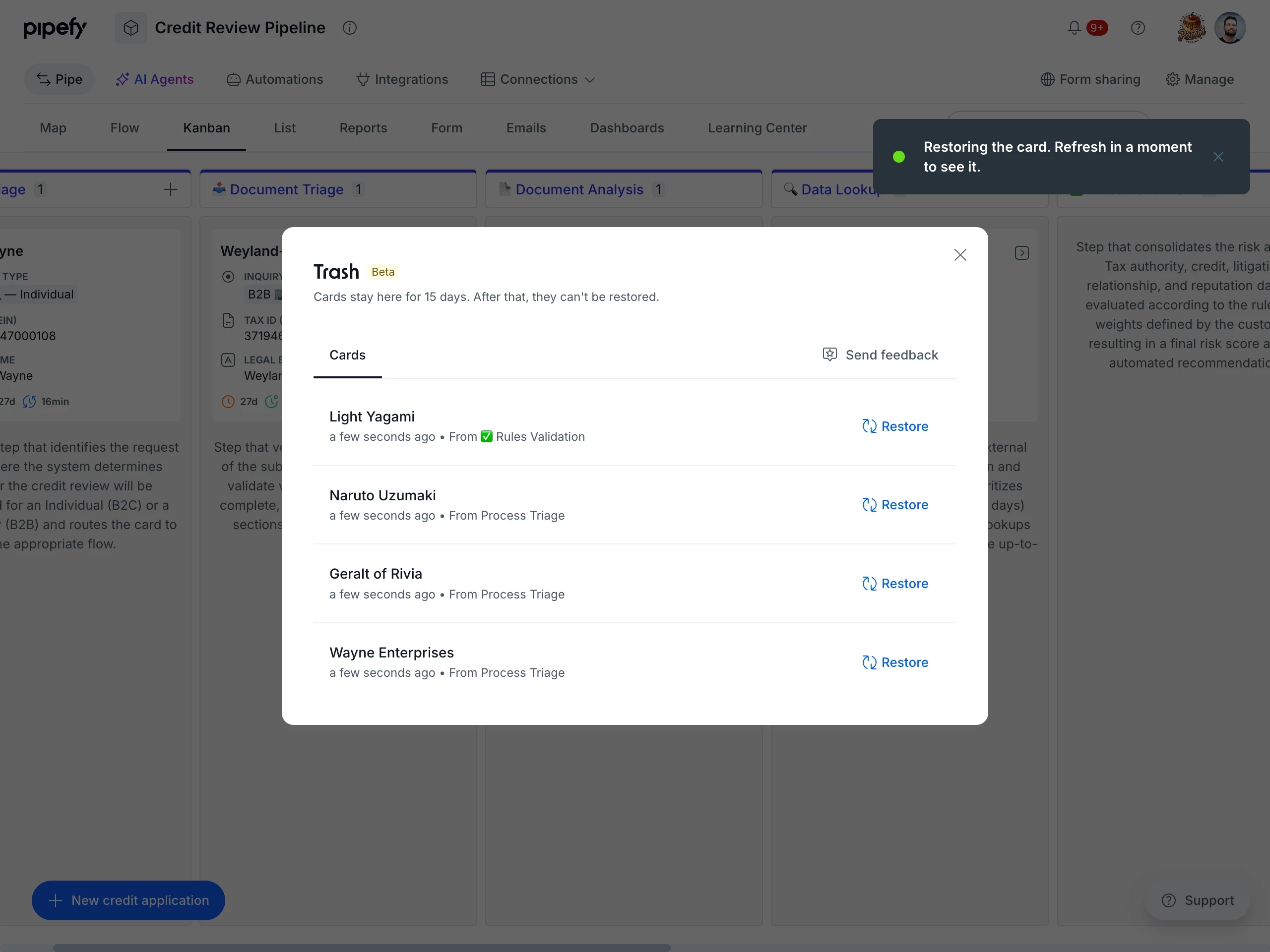
Trash gives every pipe a safety net for deleted cards. When you delete a card, it now lands in the pipe’s Trash and can be restored to its original phase within 15 days, with no support ticket needed. Recovery is in your hands, and deleting a card is no longer a final decision.
What’s new:
- Trash in every pipe, available under Manage → Trash, right where you work.
- One-click restore to the original phase and state, with a 15-day recovery window.
- Full traceability: deletion and restore are recorded in the pipe’s Activities, capturing who did what and when.
- Admin-only recovery, keeping control over what comes back into the process.
Recovery depends on the original phase still existing, since that is where the card returns. Cards tied to a deleted phase cannot be restored: when you delete a phase, the cards in it are deleted along with it and become unrecoverable.
Max effort: advanced reasoning for AI Agents in complex workflows
Max effort is a behavior-level capability that raises the reasoning precision of your AI Agents. Instead of single-shot execution, the agent follows an advanced cognitive loop: it plans, searches for specific context, reviews its own analysis, and runs targeted sub-searches as many times as needed before acting. It is the capability to reach for when a behavior needs to interpret long documents and cross-reference information before deciding.
What’s new:
- Iterative document reasoning: semantic searches, targeted page inspection, and interpretation of visual contexts such as charts, signatures, and scanned tables.
- Per-behavior isolation: turn Max effort on or off for each behavior individually, without changing the standard tasks in the same agent.
- Proven validation in high-complexity Finance and Insurance workflows.
Max effort is in Beta and is being released gradually for configuration by Pipe Admins. During the Beta, multi-step billing is not applied: the cost is the same as a regular behavior. Once it leaves Beta, each cycle of the reasoning loop will count toward billing. When enabled, the behavior uses the native Pipefy AI Pro model; BYOM keys are ignored for that behavior to guarantee execution, without affecting the agent’s other tasks.
AI Agents: improve instructions
You can now refine your AI Agent instructions with a single click. Improve instructions generates a rewrite of your prompt applying prompt engineering best practices, right inside the behavior editor. You stay in control: the suggestion comes fully editable before you accept it.
What’s new:
- Improve instructions in the behavior editor: with one click, you get a rewritten version of your prompt, clearer and more structured.
- Replace or refine: swap your current instructions for the suggested version or keep refining from it.
- Full builder workflow: together with Test behavior, it completes the Build, Test, Improve, and Create loop, all in one place.
Card Timeline: full tracking and troubleshooting for Automations and AI Agents
The card Timeline now shows clearly who or what performed each action and records how your Automations and AI Agents behave right on the card. Beyond tracking manual activity, you get a central place to investigate why an automation ran, failed, or did nothing, without ever leaving the card.
What’s new:
- Clear activity ownership: every event displays the actor with avatar, name, and email, and Automations and AI Agents carry their own distinct icons.
- Direct links to settings: events driven by an automation or AI Agent link straight to their settings page.
- Automation and Agent logs on the Timeline: automations and agents that failed, or that ran with no action due to unmet conditions, now show up directly on the Timeline, with a 90-day retention badge.
- Delete and restore tracking: the Timeline records exactly when a card is deleted or restored from the Trash, and who did it.
Human Validation for AI Agents
AI Agents can now include a human approval point in the middle of a flow. Human Validation is a checkpoint you set up inside the agent's own Behavior: at higher-risk moments, the agent pauses and sends its output to a person for approval before continuing. The control lives inside the agent's behavior, with no separate automation to configure.
What's new?
- A checkpoint set up right inside the Behavior: type `/` in the instructions and select Request Human Validation from the Actions menu, at the point in the flow where human review should happen.
- Route the review to a specific person through Send to, with the phase SLA applied automatically.
- The validation appears as its own chip on the behavior, so it's always clear which steps have a human checkpoint and which don't.
Automations View: new sorting options and more complete timestamps
The Automations view now offers new sorting options and more complete timestamps, giving you fast control over how you see your process automations and making it easy to spot what changed recently.
What's new?
- New sorting options: sort your automations by "Last Updated" or "Oldest Updated" right inside the Automations view.
- Clearer timestamps: the "Last Updated" timestamp now shows the year alongside the day and month, for an accurate and complete timeline.
