




Intelligence, governance, and agility to operate at the speed of the business
June brings one of the largest release sets of the year. Pipefy expands AI Agent capabilities with MCP, Calculations & Analysis, and BYOM; delivers surgical visibility into what happens inside processes with Card Timeline and the Pipe Audit Logs API; and simplifies building and maintaining flows with a dedicated Automations page, a redesigned Conditionals Editor, and full-page Integrations
All launches:
Pipefy Updates June 2026
Intelligence, governance, and agility to operate at the speed of the business
June brings one of the largest release sets of the year. Pipefy expands AI Agent capabilities with MCP, Calculations & Analysis, and BYOM; delivers surgical visibility into what happens inside processes with Card Timeline and the Pipe Audit Logs API; and simplifies building and maintaining flows with a dedicated Automations page, a redesigned Conditionals Editor, and full-page Integrations. The result is a platform that orchestrates more, monitors more, and requires less manual effort to run.
All launches:
MCP for AI Agents: Client and Server now available in Pipefy
Pipefy AI Agents now connect to the broader AI ecosystem through the Model Context Protocol (MCP). With the simultaneous launch of MCP Client and MCP Server, you can call external tools directly from within your Agents and expose Pipefy processes as tools to third-party AI interfaces.
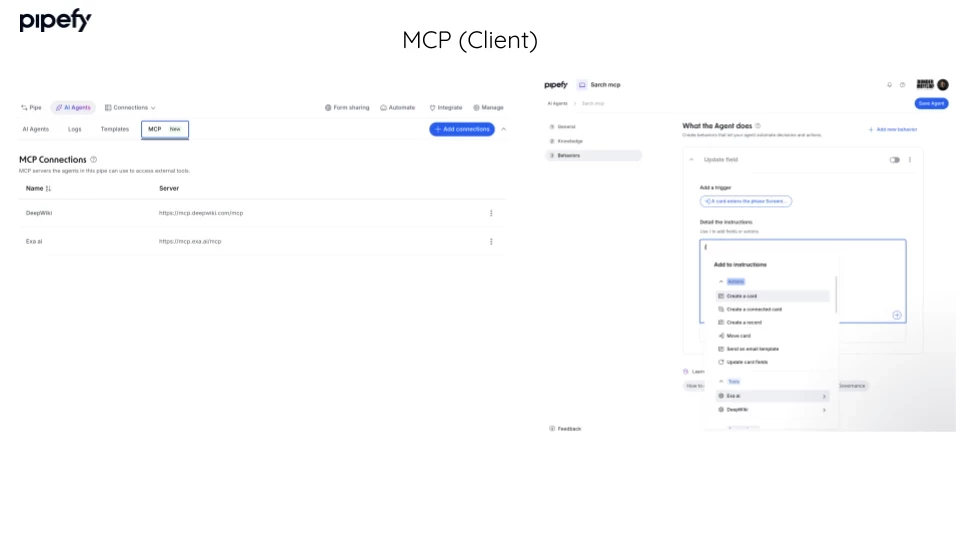
- MCP Client: your Agents call external tools (Slack, Salesforce, and others) directly from within workflow behaviors configured in Pipefy, without leaving the platform.
- MCP Server: exposes Pipefy processes as tools that MCP-compatible AI interfaces (such as Claude Code and Cursor) can access and execute through natural language.
The practical outcome: complex cross-system workflows that previously required manual coordination can now be executed entirely through natural language, with governance and traceability kept inside Pipefy.
AI Agents: Calculations & Analysis for business logic without hallucination
Pipefy AI Agents now include a capability that addresses one of the most critical limitations of generative AI in operations: mathematical imprecision. With Calculations & Analysis enabled, agents write and execute small programs at runtime inside a secure sandbox, delivering absolute accuracy for math, complex business logic, and data extracted from documents.
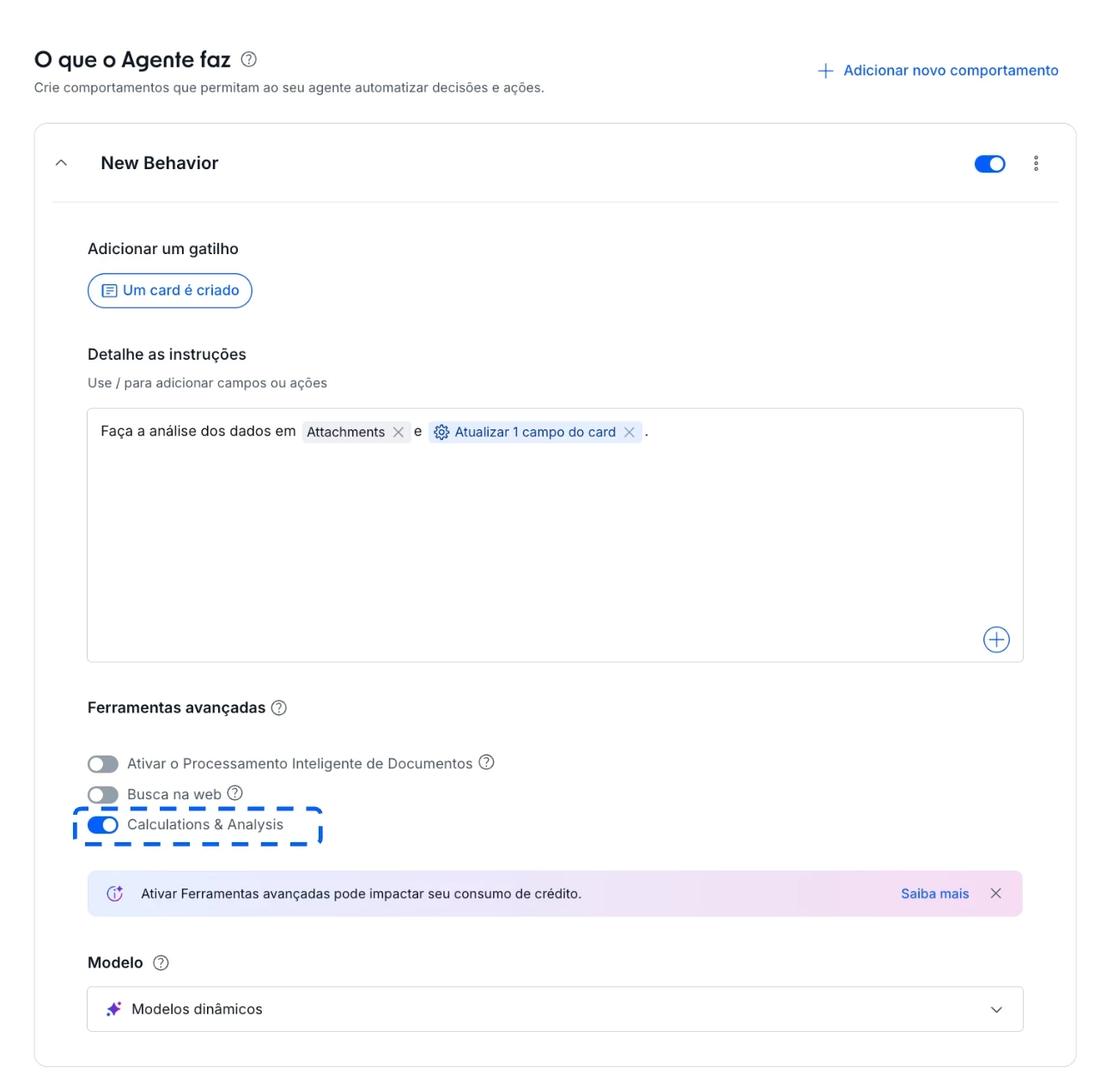
What this solves in practice:
- Invoice totals, conversion rates, cost center splits, and penalty calculations computed with absolute precision, with no risk of hallucination.
- Business rules described directly in the agent configuration, with no external spreadsheets or custom integrations.
- Documents converted into structured data: PDFs and images with tables become treated values, ready to populate pipe fields.
BYOM: bring your organization's AI models into Pipefy
Bring Your Own Model (BYOM) is now available for all companies on Pipefy. Register multiple LLM providers and models in your organization and assign the right model to each Agent Behavior directly in the Agent Builder.
Each step in your process runs on the model that fits it best, from lightweight extraction to complex reasoning, all within the same pipe.
What's new:
- Model Registry: register more than one provider simultaneously (OpenAI, Azure OpenAI, Google Vertex, Oracle OCI, AWS Bedrock, and custom providers via self-hosted endpoint) and set an organization default.
- Per-Behavior selection: Pipe Admins assign a model to each behavior directly in the Agent Builder.
- Three-layer fallback: Behavior model, org default, and Pipefy AI as the safety net.
AI Agents: granular model and skills control per behavior
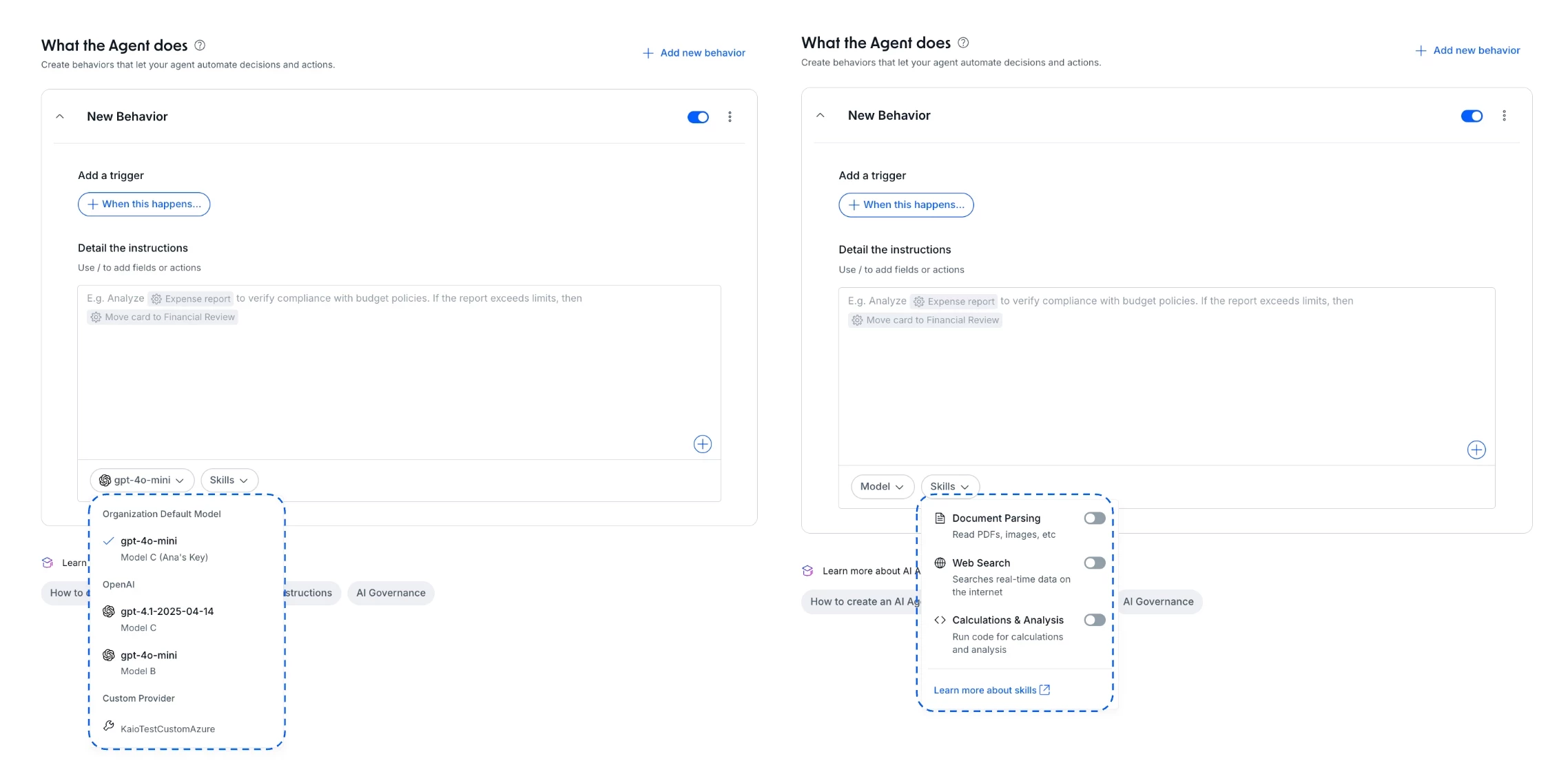
The Agent Builder now includes a per-behavior configuration panel that consolidates model and capability decisions in one place. Pipe Admins define which language model and which skills are active directly within each behavior, without relying on global settings that apply uniformly across all flows.
What's new:
- Per-behavior model selection: if the org has more than one LLM configured, you choose which model to use in each behavior.
- Per-behavior skills management: enable or disable specific capabilities (IDP, Web Search, Calculations & Analysis) for each behavior individually.
Agent Builder: duplicate agents in one click
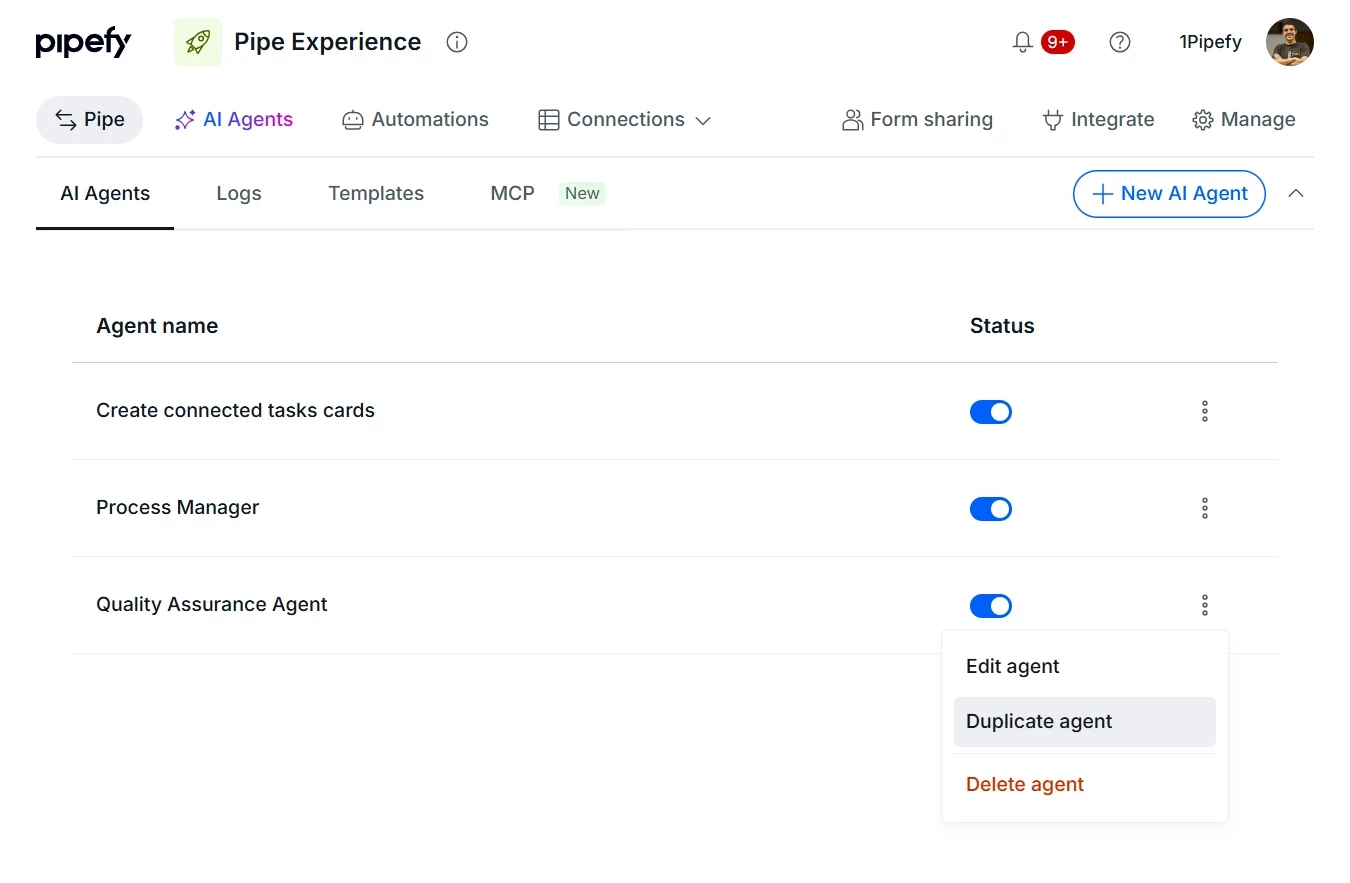
The Agent Builder now lets you duplicate an existing agent with a single click. The copy preserves all original configurations (instructions, context, and behavior settings) and is created disabled by default so you can make adjustments before activating it.
When you need multiple agents that share a common foundation, want to run A/B variations, or need to adapt an agent for a new department, you start from something that already works instead of rebuilding from scratch.
Card Timeline: see everything that happened in a card, from start to finish
Card Timeline is a complete chronological view of a card's history, accessible directly from the Activities tab. Every phase transition, human action, executed automation, and field change in sequence, all in one place.
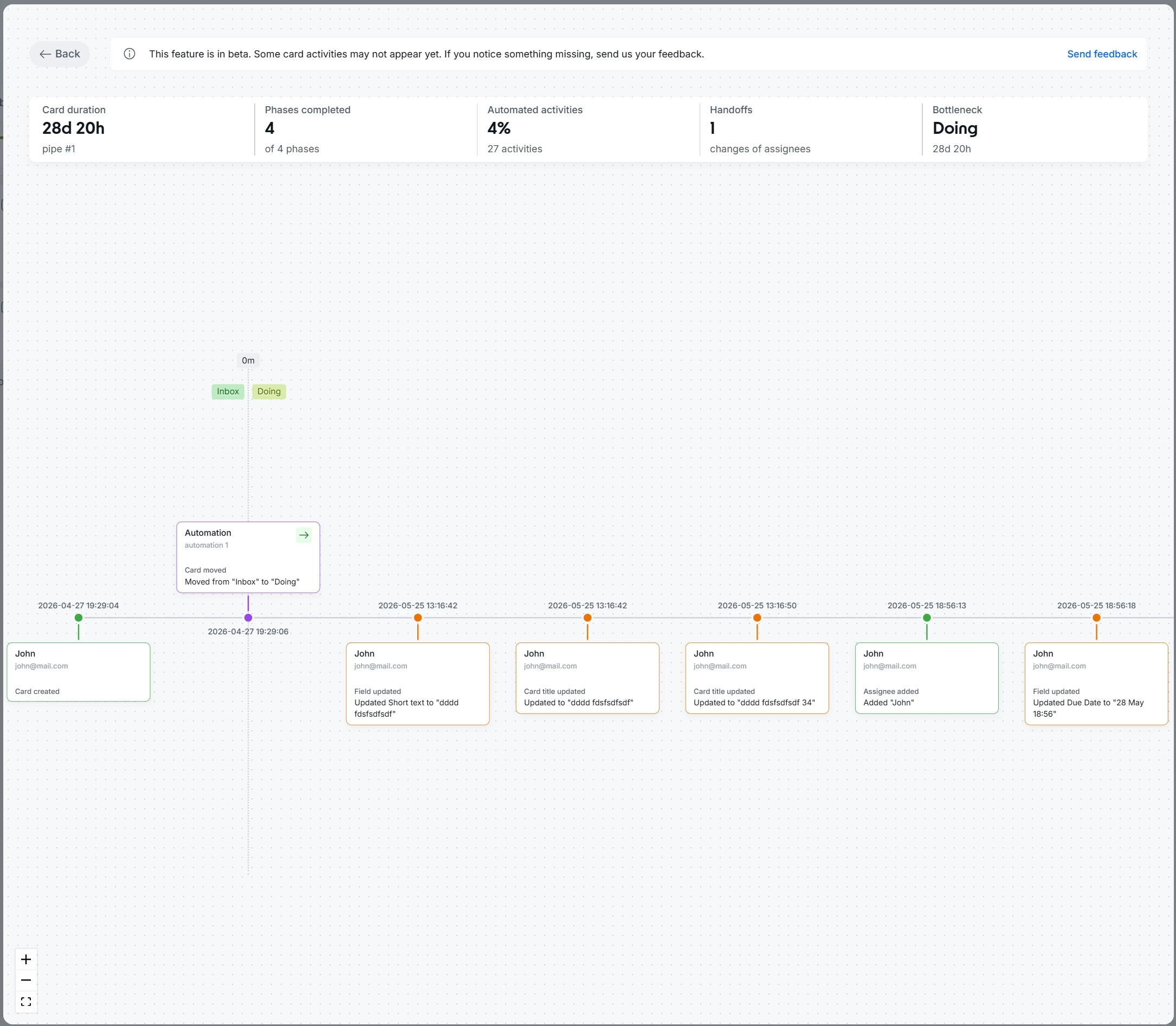
What this changes in practice:
- Faster diagnosis of failures and bottlenecks: you identify where an automation failed or who changed a critical field without involving anyone else.
- Clearer picture of how processes work in practice: the Timeline shows how work actually flows, not just how it was designed.
- Faster onboarding for new team members: anyone joining the team reviews a card's full history to understand the process without relying on manual handoffs.
Automations: more visibility, search, and filters inside the Pipe
Automations now has a dedicated page in the Pipe header, right next to AI Agents. The update brings more visibility and control to anyone managing automation rules: navigate, search, and share automations directly, without intermediate menus.
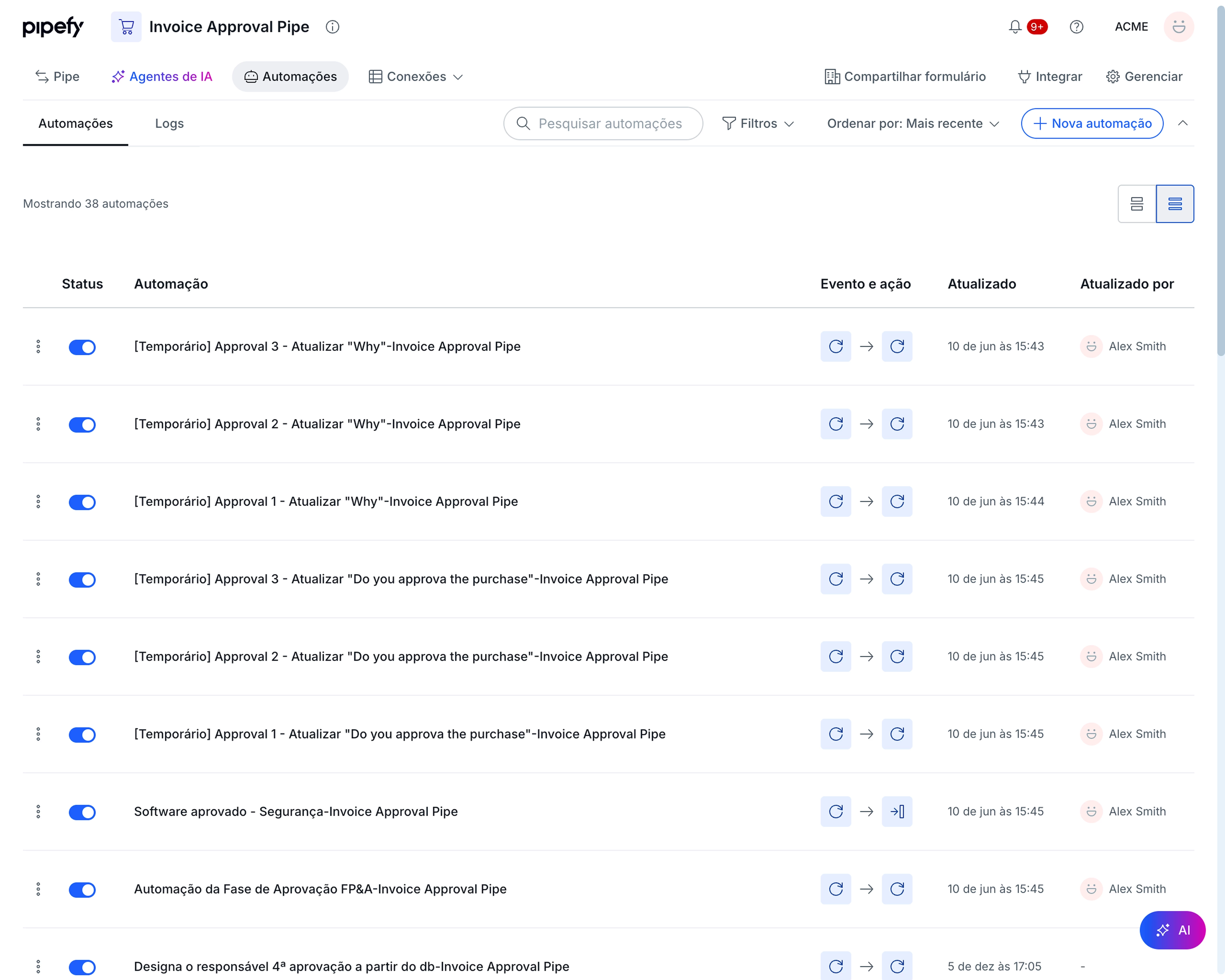
What's new:
- Card view: Event, Action, last updated date, and last editor visible without opening the automation.
- Table view: compact format for pipes with many automations.
- Search, filters, and sorting available right at the top of the page.
- Dedicated URL: you can now link and share a pipe's automations page directly.
Conditionals Editor: cleaner interface, clearer logic, safer editing
The Conditionals editor has been redesigned from the ground up. The previous experience made it hard to follow the configured logic, especially when working with AND/OR conditions across more complex flows. The new interface lets you see exactly what you are building, with a visual hierarchy that reflects real execution order and controls that prevent accidental loss of configuration.
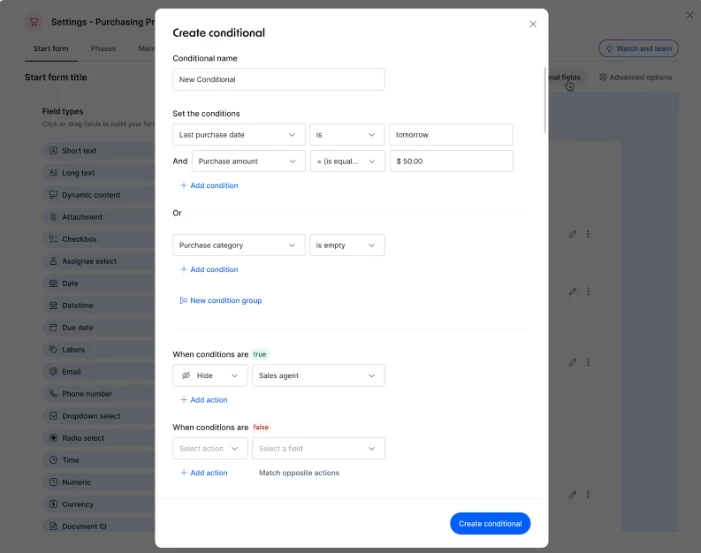
What's new:
- Explicit AND/OR logic: it is now clear when all conditions must be true versus any one of them.
- Improved visual hierarchy that reflects the real execution order of conditions.
- Safer interactions: discard confirmation, explicit condition deletion, and hover-to-remove on individual conditions.
Pipefy Integrations: full-page experience
Pipefy Integrations now opens in full page inside your Pipe. The new experience replaces the modal view and puts the flow building canvas in a wide, unobstructed workspace, aligned with the same navigation already used by Automations. All your existing logic, data mappings, and active flows remain exactly as they were.
The "Integrate" tab has been renamed "Integrations" and moved next to Automations in the Pipe navigation bar. The first time you access it after the change, a contextual tooltip points you to the new location automatically.
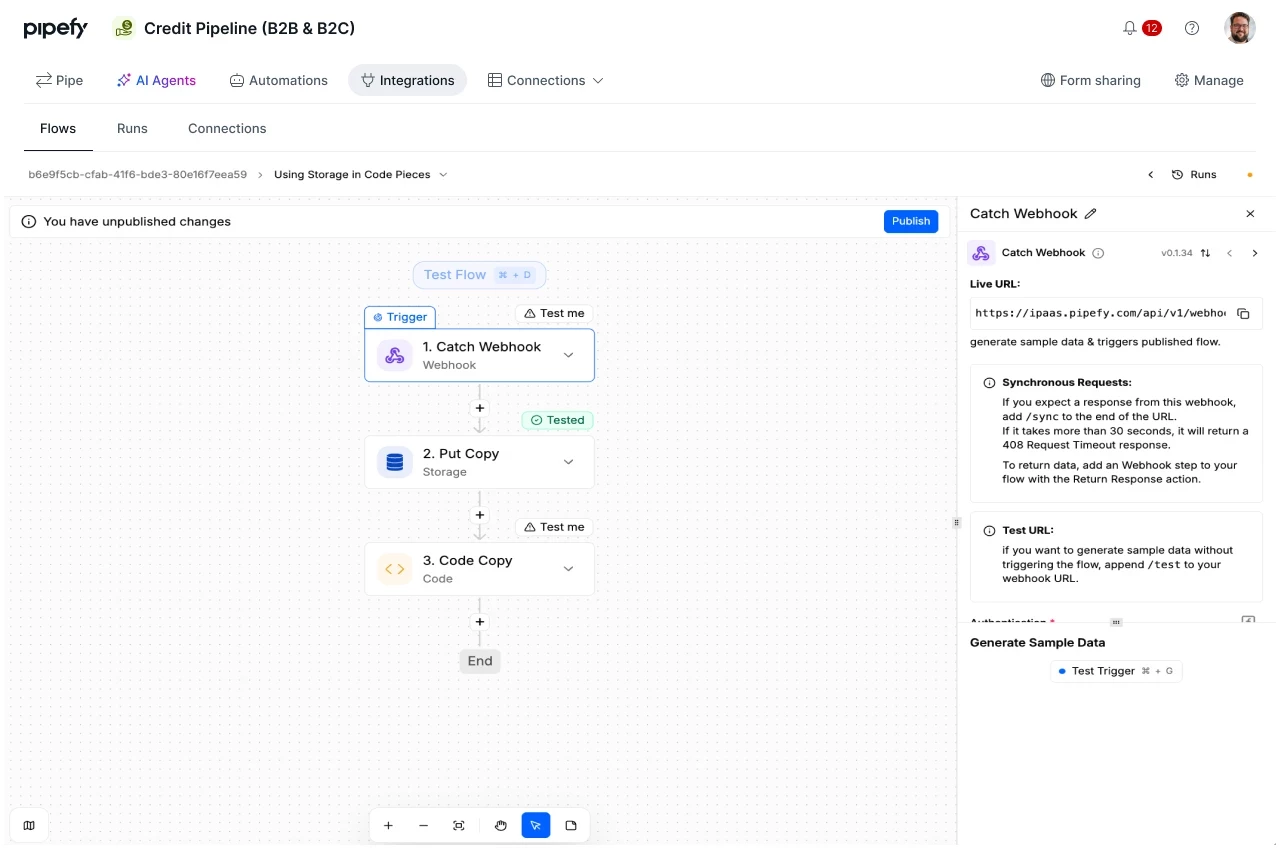
Pipe Audit Logs API: programmatic log export
The Pipe Audit Logs export API is now available for all customers. IT teams can programmatically extract audit records from any pipe and feed that data into SIEMs, BI platforms, Data Lakes, or AI Agents.
For companies with regulatory requirements such as SOX and BACEN, the API supports long-term retention by allowing customers to store logs in their own infrastructure.
What's new:
- Batch export endpoint per pipe: request file generation via API and receive a webhook notification when the file is ready for direct download from S3.
- Formats: JSONL and CSV.
- Selection window: up to 30 days of data within a 180-day history.
- Coverage: Pipe Configuration Changes and Card Activity.
Automation Alerts via Webhook: real-time notifications for every automation execution
Automation Alerts via Webhook delivers real-time notifications for every automation execution in Pipefy, whether it succeeds or fails. Configure a webhook endpoint per pipe and start receiving execution status automatically, including root cause context whenever something goes wrong.
What's new:
- Full payload: automation name, trigger, action, execution status, duration, and card and pipe details.
- Root cause context on failures: the payload includes the reason: wrong conditional field, required field violation, empty field, and others.
- Filters by trigger and action type: each webhook can be configured to deliver only the relevant alerts for that pipe.
Integration Usage Stats: full visibility into your integration consumption
Account admins now have access to a dedicated integration usage stats screen, available directly in the admin panel (Admin Panel > Usage Stats > Integrations). This update closes a critical gap for accounts running complex operations: understanding exactly where and how native integrations are being consumed.
What's new:
- Total integration consumption: a macro view of the full volume processed across all integrations in the account.
- High-impact flows: quick identification of which integration flows are driving the highest usage.
- Flow-by-flow metrics: exact total and percentage of consumption per individual flow.
- Operational mapping: which pipe hosts each specific integration flow.
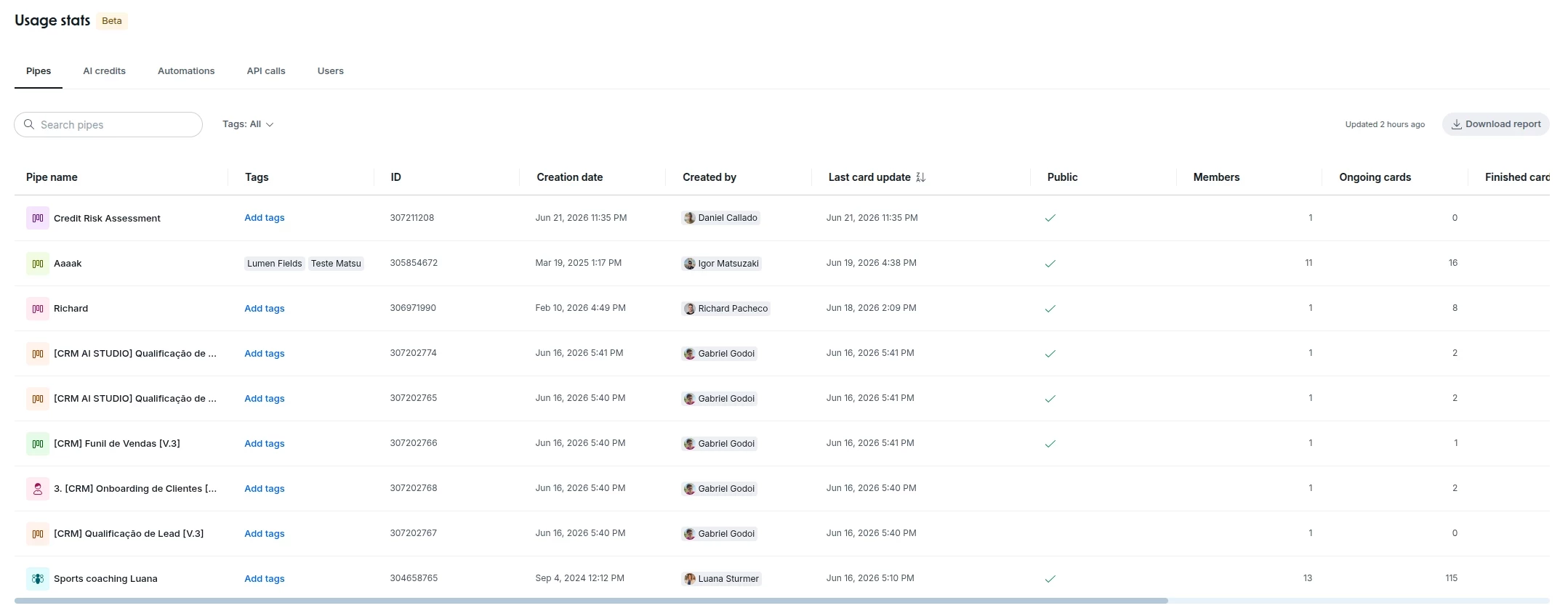
Usage Stats: new pipe visibility column in the admin panel
The Usage Stats panel now includes a dedicated column showing each pipe's visibility status, giving organization admins a centralized way to identify which pipes are configured as public or private.
The column supports sorting, making security reviews and audit cycles significantly faster. The feature is read-only: it provides full visibility without modifying any existing permissions.
Company Overview: a new way to manage multiple organizations in Pipefy
Company Overview is the governance hub that brings together everything IT admins need to track process health, automation performance, and API consumption across the entire Pipefy operation in one place.
What's new:
- Pipe level charts inside Automations: drill down from organization level health straight into a specific pipe to track volume and bottlenecks process by process. Available under Usage Stats, Automations section.
- Export report button for API calls: download API consumption reports in one click, ready for auditing or external analysis. Available under Usage Stats, API section.
- Native feedback button inside Usage Stats: a feedback channel is now built directly into the Usage Stats page, so you can send suggestions or report issues without leaving your workflow.
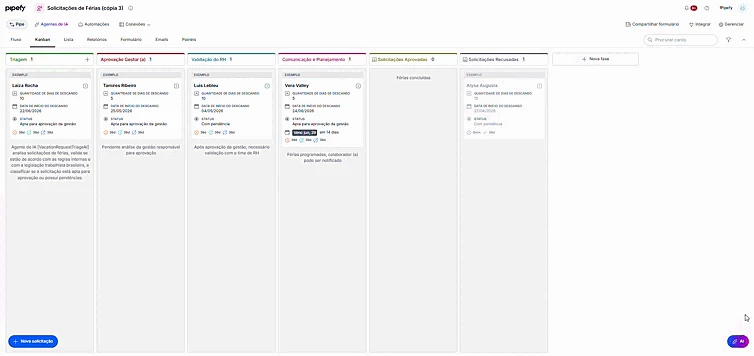
Piper on the Pipe screen: get product help without leaving your flow
Piper, Pipefy's support assistant, is now available directly on the Pipe screen. The icon appears in the bottom right corner of the pipe view and you get answers about the product the moment you need them, without interrupting what you're doing.
When your question needs more, you can escalate to human support directly from the conversation, without switching to a different channel. Available for all Pipefy customers.
Text Editor: a modernized editing experience across Pipefy
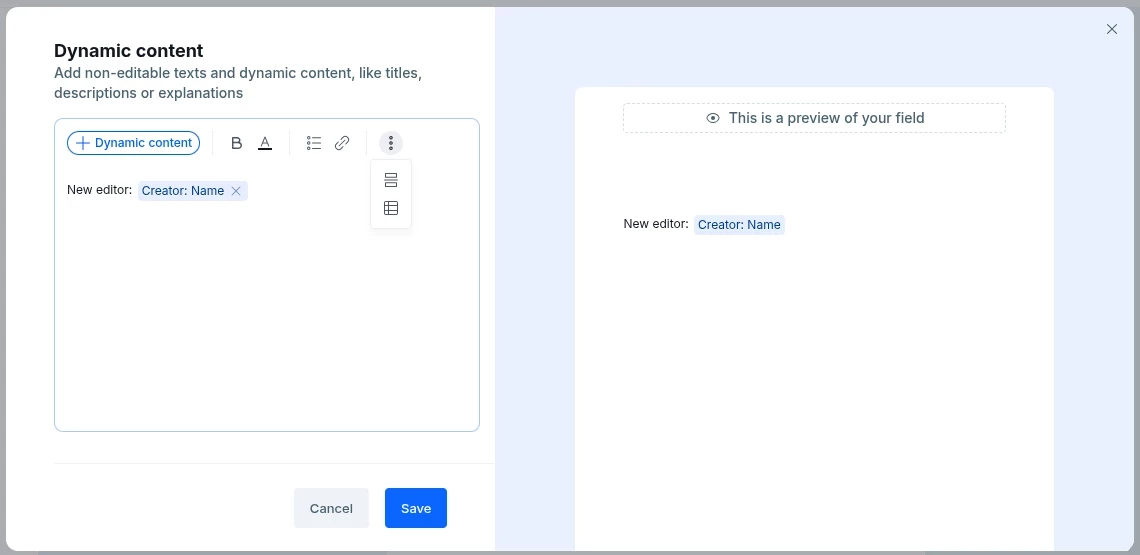
Pipefy is rolling out a new Text Editor across key areas of the platform. The update brings a unified content creation and editing experience that is more consistent, fluid, and visually coherent, no matter where you're working inside Pipefy.
What's new:
- New editor in Portal and Interface text elements: edit instructions, descriptions, and text content through a refreshed, cleaner, and more responsive interface.
- New editor in Dynamic Fields inside Pipe phases: create and format content in dynamic fields with the same modern experience now available across the rest of the platform.
