




👤 For pipe admins who define rules and monitor AI Agents
🔐 Available on all plans, subject to AI enablement and company credits
🎯 To turn a calculation rule into clear instructions and validate the result before expanding use
A reimbursement request arrives with an amount, a category, and a receipt. Someone needs to apply the policy, check its limit, and explain what happens next. An explicit rule and a result that can be checked help people apply the same criterion across requests.
By the end of this article, you will know when to use Calculations and Analysis in an AI Agent, how to describe inputs and exceptions, and how to check a numerical example. We will use reimbursements to separate calculation from the approval decision.
What you will learn:
Choose a task that needs calculation
Calculations and Analysis allows an agent to execute code during a run to perform operations and apply logical rules. The capability must be enabled in the behavior. Use it when a task requires a numerical result or a transformation governed by defined rules, alongside interpretation of context. The Calculations and Analysis update introduces the capability and application examples.
Calculating the eligible reimbursement amount under a cap is different from writing an explanation to the requester. The calculation needs a verifiable numerical rule. The explanation communicates that result. Separating the responsibilities makes it easier to check each output.
Before choosing an agent, establish where the rule is maintained and who owns it. If an existing system supplies the official calculation, preserve that reference and agree with its owners on Pipefy's orchestration role. Avoid maintaining a second version without a defined update process.
For the relationship between calculations and other agent capabilities, see the Execution journey.
Write the rule before writing instructions
Define the business criterion so another person could reproduce the calculation. Specify the currency, the policy's effective period, each input's meaning, and how to handle missing information. The policy owner should confirm these decisions.
Consider a hypothetical rule: for an eligible expense, the reference reimbursement amount is the lower of the reported expense and a cap of BRL 200.00 per request. Missing information or a negative amount requires review. The agent calculates the reference amount, while a person retains final approval.
This is a teaching example. Your company may use a daily cap, category limits, or a limit per employee. Changing “per request” to “per day” changes the required information and the way results must be checked. Resolve those choices before drafting the instructions.
A clarity check: two people given the same inputs and policy should be able to reach the same expected result. If they interpret the cap differently, review the definition with the process owner before configuring the agent.
Define inputs and outputs you can check
The example uses the reported amount, expense eligibility, and the current cap as inputs. These are illustrative names to adapt to existing fields. Establish where eligibility comes from: the presence of an amount does not establish that an expense qualifies.
One possible instruction is: “For eligible expenses with a valid amount, calculate the lower of the reported expense and the cap per request. If the amount or eligibility confirmation is missing, do not estimate it: indicate that review is required. Return the calculated amount and the reason for the proposed handling separately. Approval remains with a person.”
Connect dynamic information to real fields and verify the output destinations. A monetary amount and an explanation need destinations compatible with their content. The Calculations and Analysis configuration guide explains capability enablement and result field selection.
The example instruction depends on configuration. Before activating the behavior, confirm its inputs, outputs, and allowed actions. Keeping approval with a person must be reflected in the actual process design and the agent's configured actions.
Test rule boundaries against known results
Prepare expected results before looking at the agent's answer. For an eligible expense with a BRL 200.00 cap per request, your checks could include:
- A BRL 150.00 expense: reference reimbursement of BRL 150.00.
- A BRL 200.00 expense: reference reimbursement of BRL 200.00, with no excess.
- A BRL 250.00 expense: reference reimbursement of BRL 200.00 and excess of BRL 50.00, if you also request that output.
- A missing or negative amount: review required, without inventing an eligible amount.
- Eligibility not yet confirmed: review before applying the calculation.
Check the number, explanation, and output destination separately. A correct result written to the wrong place still needs attention before routine use. Add cases with decimal amounts when they occur in your process and define the company's rounding criterion in advance.
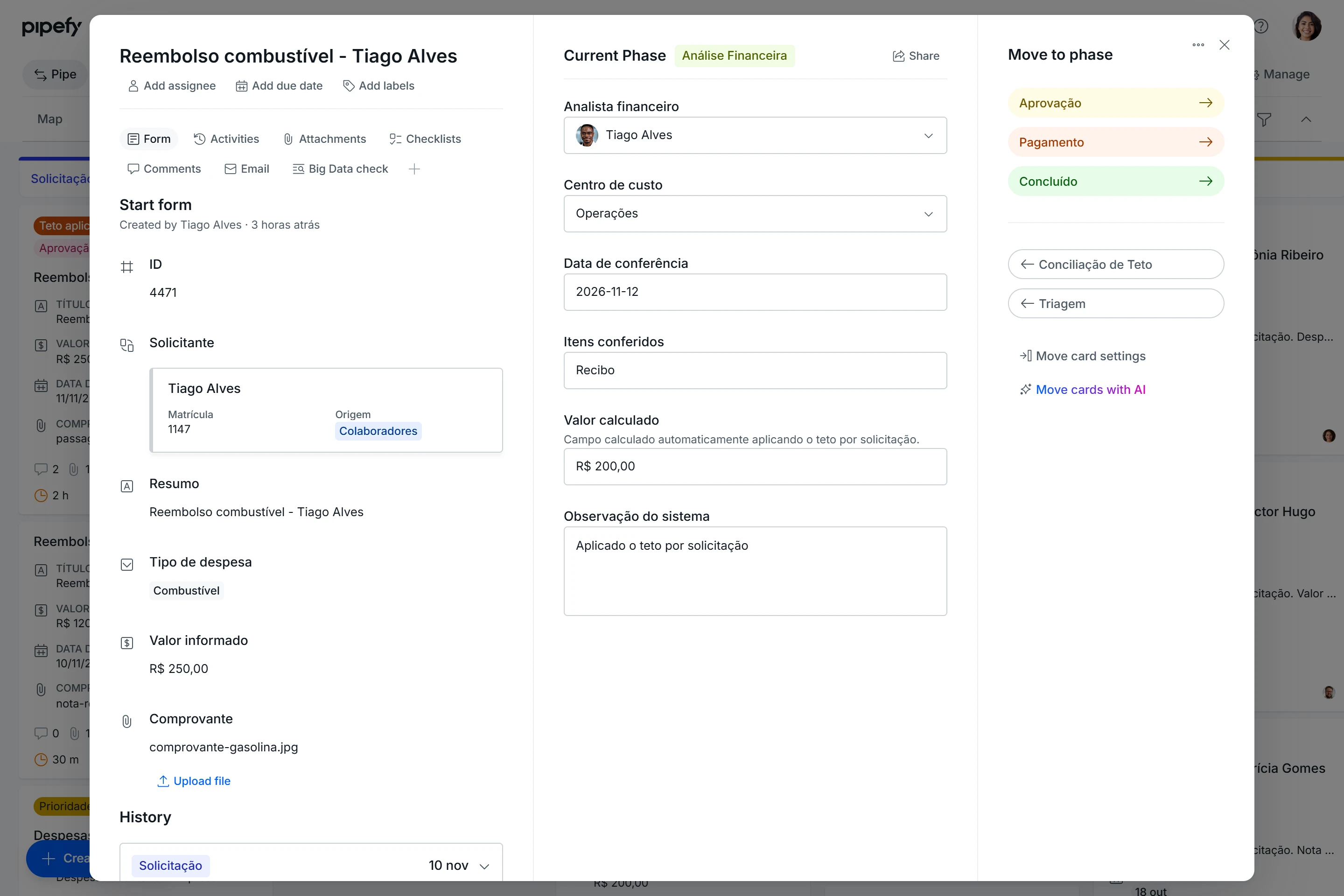
Illustrative example: a BRL 250.00 expense produces a BRL 200.00 reference amount after applying the cap. Check the calculation and explanation; approval remains with the responsible person. Example contains Portuguese labels.
Monitor the calculation before expanding use
Start with a sample the rule owner can review. Beyond checking the arithmetic, examine whether the exception is clear to whoever handles the next step. Aim for a result that can be explained and checked again.
In Logs and Tracing, a Calculations and Analysis execution allows you to inspect the executed code and its result. Use that evidence when the output differs from the reference calculation, and involve a technical owner when code inspection is necessary. The Logs and Tracing guide, in Portuguese, explains this review. To organize that review, read How to investigate an AI Agent execution.
After changing the rule or instructions, rerun cases that were previously correct as well. Record who approved the updated policy and which examples were checked. Expand use once the calculation, exception handling, and continuation of work meet the agreed criterion.
To develop your approach to task selection and agent customization, continue with the Pipefy AI Certification at Academy, taught in Portuguese. You need to sign in or create an account to access the lessons.
Before moving on, confirm that you understand:
☐ A rule needs defined inputs, units, boundaries, and exceptions before configuration.
☐ A reference calculation and approval are separate responsibilities.
☐ You can compare the number, explanation, and destination with results prepared before testing.
Ready to examine what supports each result? Continue with How to investigate an AI Agent execution.
