



👤 For pipe admins and people who monitor agent results
🔐 Logs are available on all plans, subject to pipe access and permissions for related records
🎯 To locate the right execution and identify evidence for the next adjustment
A request received an unexpected result, and the team needs to decide what to review. Rewriting every instruction immediately leaves the main question unanswered: did the agent receive the required data, consult the intended reference, and complete the expected action?
By the end of this article, you will be able to locate an execution, connect its records with the result, and choose an adjustment supported by evidence. We will use reimbursement review to distinguish inputs, reference consultation, calculation, and action on the card.
What you will learn:
Define the difference you need to explain
Before opening the records, write down the expected and observed results. “The agent did not work” leaves the investigation undefined. “The reference amount should respect the cap per request, but the recorded result differs from the expected calculation” gives you something to compare.
In this hypothetical example, an eligible BRL 250.00 expense has a BRL 200.00 cap. The process expects a BRL 200.00 reference amount for human review. If the card shows a different number, preserve that observation, the policy used as the reference, and the approximate time. Do not change the records to match the expectation before completing the analysis.
Also distinguish execution outcome from business judgment. A completed run still needs to be checked against the policy and process criteria to establish whether it delivered the intended result. The Execution journey places that review in the broader use of agents.
Locate the card and behavior execution
In the pipe's AI Agents area, Logs identify executions by agent, behavior, and card. Compare the time with the occurrence you are investigating as well. One card can be involved in several runs; selecting the correct record avoids explaining a result with evidence from a different moment. The Agent Logs update provides context for the execution records.
Review the context and status in Summary before looking deeper. If you cannot find the expected execution, confirm the card, behavior, period, and access with the admin. An entry missing from your first search is something to clarify rather than proof of a cause.
The Help Center guide to Logs and Tracing, in Portuguese, explains this area. To connect the execution with the request's path, also use the card's Timeline. To reconstruct the request's movements, read Why a card did not move as expected.
A useful investigation reference: the card link, agent, behavior, time, and difference between the expected and observed result. This allows someone else to continue from the same point.
Read the path from the first discrepancy
In Tracing, examine the available steps and look for the first place where the evidence differs from the expectation. Depending on the capability used, you may be able to review knowledge consultation, actions, and calculation results. Follow what that particular run actually recorded. Also see the tracing update for advanced capabilities.
For the reimbursement, organize the investigation around questions. Was the amount taken from the correct request? Was the consulted policy current? Did the rule apply the cap per request? Was the result sent to the intended field? Each answer narrows the next review.
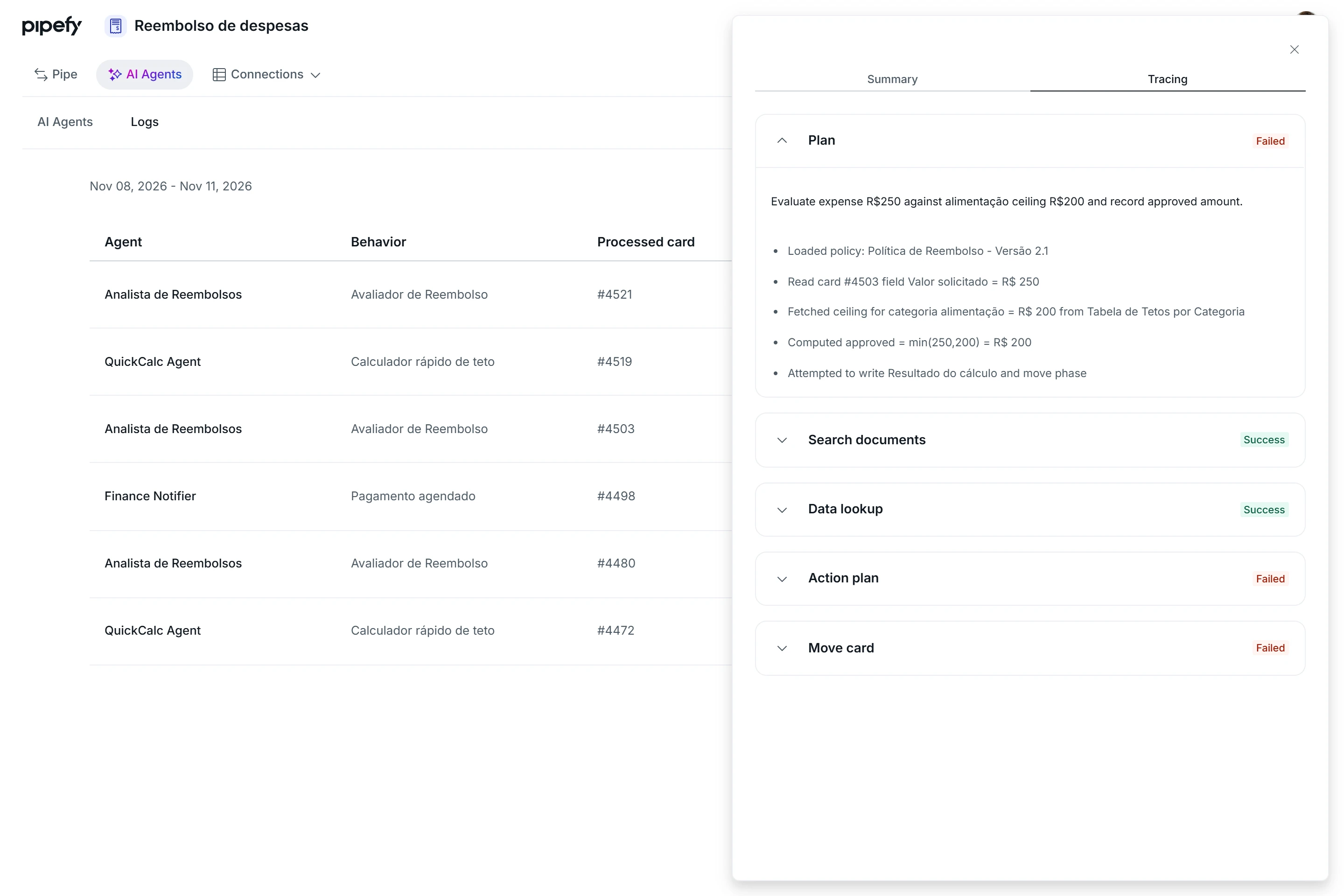
Illustrative trace showing reference consultation, calculation, and actions. Compare each step with the expected result to locate the first point requiring investigation. Example contains Portuguese labels.
When the behavior uses Calculations and Analysis, tracing allows you to inspect code and its result. Compare the number with a reference calculation prepared in advance. The Calculations and Analysis guide explains the capability. Involve a technical owner when understanding the code is necessary for the investigation. If you are still defining the reference calculation, read Calculations and business rules with AI Agents.
Respect the limits of the record. The documentation notes that details depend on the action and permissions. When information is not exposed, record that limitation and seek other evidence rather than filling the gap with an assumption.
Distinguish failure from an action not taken
Records can describe different situations. Failed indicates a failure to investigate. Skipped identifies an action not taken, accompanied by the agent's stated reason. Conditions not met means the triggering conditions were not satisfied and no action was performed.
Read the details before choosing a change. An action not taken may be consistent with the process criterion, such as requiring eligibility confirmation before a calculation. If a condition should have been true, review the data and the rule applicable at that moment.
When a failure includes a cause, use it to direct the review. Missing data requires a different investigation from an access restriction. Preserve the company's approved permissions and involve the relevant owner when required access is unavailable.
Adjust one hypothesis and check again
Turn the finding into a bounded change. If the evidence shows that the instruction did not distinguish a cap per request from a daily cap, confirm the policy and state that criterion explicitly. If the result went to an unintended field, review the destination with the admin. Match the adjustment to the point you identified.
Retest the case that prompted the investigation and include cases that previously met expectations. Before repeating a run, check completed actions and potential effects, especially messages and card movements. Compare the number, explanation, and continuation of work again.
Record which hypothesis was confirmed, what changed, and how the new result was checked. If the cause remains unproven, gather the context and send the specific question to the technical owner or support. This preserves the exact point reached in the investigation.
To deepen your approach to agent application and customization, the Pipefy AI Certification at Academy, taught in Portuguese, complements this investigation practice. You need to sign in or create an account to access the lessons.
Before moving on, confirm that you understand:
☐ You need to match the card, behavior, and time before interpreting an execution.
☐ Execution status must be checked against the process's expected result.
☐ You can record the first discrepancy, test an adjustment, and preserve questions that still need confirmation.
Ready to review the complete path? Return to Find bottlenecks along your process.
