



👤 For company admins, super admins, and people responsible for monitoring AI usage
🔐 Subject to contracted features, available credits, and permissions for each dashboard; Company Overview requires access to manage multiple companies
🎯 To connect consumption, workload, and outcomes and choose what needs review
The Purchasing team started using AI to review requests and noticed an increase in credit consumption. The total alone does not explain whether more requests arrived, an additional stage began running, or the configuration changed. Without separating these possibilities, deciding where to focus and how to plan continued use becomes difficult.
By the end of this article, you will be able to combine company usage figures with execution evidence, compare periods, and record a monitoring action. The purchasing example will help distinguish workload, consumption per run, and commercial terms, without treating AI credits as a fixed monetary amount.
What you will learn:
Separate credit consumption from contracted cost
AI Credits measure the use of AI features. Financial cost depends on the company's contract. Before preparing a monetary forecast, confirm available credits and applicable packages with the contract owner. A usage figure does not, on its own, establish an additional charge.
For AI Agents, the model is selected per behavior, and specific capabilities can add consumption. Counting cards or agents therefore does not establish the total. One request can involve several behaviors, and different runs can use different resources. The models and consumption documentation explains these distinctions.
Keep three records separate: observed consumption, the corresponding workload, and the contractual reference. For Purchasing, that means knowing how many credits were used, how many requests and runs belong to the period, and what capacity is available for continued work.
Ask a specific management question: did consumption rise because AI handled more requests, because each request required more work, or both? Each hypothesis calls for a different review.
Choose the view that answers your question
To review company AI consumption, use the Admin dashboard and the AI Credits area in Usage statistics, according to account access. This establishes the baseline for monitoring. The documentation on Pipefy AI consumption, in Portuguese, introduces this access point.
When your responsibility covers several companies in Pipefy, Company Overview brings indicators into a centralized view. Its AI Credits chart shows monthly consumption trends. Use it to identify differences between units and choose where to look more closely, within your access to manage multiple companies.
The Company Overview monthly chart update, in Portuguese, introduces that view. The Pipefy Updates Governance journey connects usage monitoring with broader governance decisions.
Compare the same scope. Confirm the company, period, and resource before combining figures. Automation tasks and API calls measure different resources; adding them to AI credits would mix different units.
Compare periods alongside workload
A useful comparison shows both the total and the work behind it. Consider this hypothetical example, calculated outside the dashboard solely to illustrate the reasoning:
- Period A: 100 requests, 100 runs of the behavior being monitored, and 200 credits consumed. Observed average: 2 credits per run.
- Period B: 150 requests, 150 equivalent runs, and 300 credits. Total consumption increased, while the average remained at 2 credits per run.
- An alternative period B: 100 requests, 200 runs, and 400 credits. The average per run is unchanged, but there were more runs for the same number of requests.
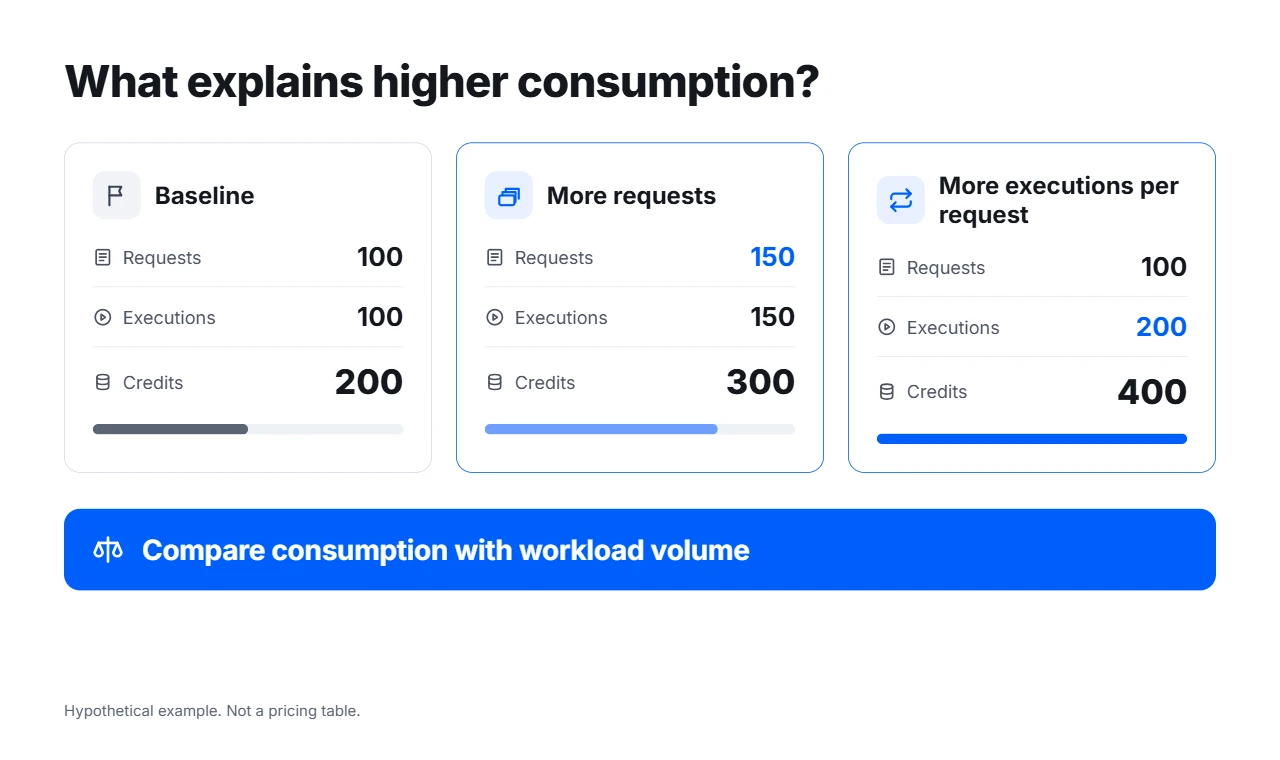
Consumption can grow as request volume increases or as more executions are needed per request. Compare equivalent sets before deciding what to review.
These figures are not a price list. They show why the denominator matters: higher consumption may reflect more work or warrant a review of triggers. Obtain workload figures from the team's reporting source and calculate averages only for comparable sets.
Also assess the outcome: was the review complete, did requests reach the intended human review, and did any work need repeating? Lower consumption alone does not establish a better configuration. For estimates and model selection, see How to plan and manage AI Credits in Pipefy.
Investigate a run before changing the configuration
When a discrepancy appears, choose representative cases and match the card, behavior, and time in the agent's Logs. This helps identify the references and actions involved in that execution. The Logs and Tracing guide, in Portuguese, explains the available records.
For accounts with execution cost visibility, Summary shows the credit total, and the breakdown by node helps identify where consumption occurred. Test Behavior can also show an estimate for the configuration being assessed. The cost visibility update, in Portuguese, notes a gradual rollout; check availability in your account.
In Purchasing, the review may show that some requests now include document reading. Before removing a capability or changing the model, establish why it is needed and compare cases with equivalent inputs. A test estimate informs the choice, but it does not replace observed consumption and actual operational volume.
To organize the review, continue with How to investigate an AI Agent execution. Match the next change to the evidence while preserving output quality and the process's approval requirements.
Turn the findings into a monitoring routine
Decide who reviews the figures, which period to compare, and what change needs attention. A team with frequent volume changes might agree on a weekly review and another check before expanding use. This is a management choice, not a statement about dashboard refresh frequency.
Record a verifiable conclusion. For example: “Consumption grew alongside request volume, with the same average per run. We will review next week's results before expanding to another unit.” If the average changes, record the hypothesis, selected cases, and review owner.
To explore how context, capabilities, and instructions influence agent work, see the Pipefy Artificial Intelligence Specialist Certification. The course is in Portuguese, and accessing lessons requires signing in or creating an Academy account.
Before moving on, confirm that you understand:
☐ Credits used and contracted financial cost are different information.
☐ Comparing consumption requires matching periods, scope, and workload.
☐ You can choose evidence to review, assign an owner, and record the next check.
Ready to verify the rule behind an AI calculation? Continue with Calculations and business rules with AI Agents.
