Question

How to create FieldConditionals via GraphiQL Api

  • October 6, 2025
  • 3 replies
  • 75 views

gustavonu

Is it possible to create Field Conditionals via Pipefy API Query? 

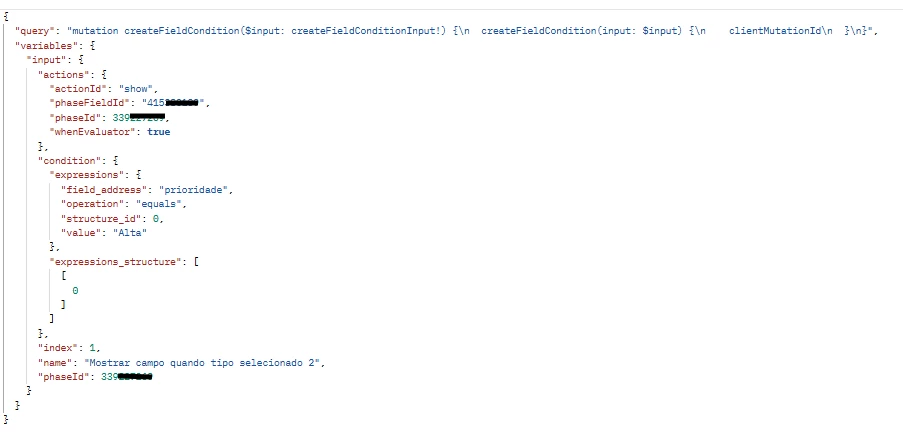
I did my best following the documentation, and got to the query 

mutation {
  createFieldCondition(
    input: {
      name: "Mostra Endereço de Entrega para Produtos (show endereco_entrega)",
      phaseId: "340497504",
      actions: [
        {
          actionId: "show",
          phaseFieldId: "endere_o_de_entrega", 
          whenEvaluator: true
        }
      ],
      condition: {
        expressions_structure: [0],
        expressions: [
          {
            field_address: "tipo_de_compra", 
            operation: "equals",
            value: "Produtos", 
            structure_id: 0
          }
        ]
      }
    }
  ) {
    fieldCondition {
      id
      name
    }
    clientMutationId
  }
}

Which yields me 


{
  "data": {
    "createFieldCondition": null
  },
  "errors": [
    {
      "message": "Validation failed: Actions field não pode ficar em branco",
      "locations": [
        {
          "line": 2,
          "column": 3
        }
      ],
      "path": [
        "createFieldCondition"
      ],
      "extensions": {
        "code": "RECORD_INVALID",
        "correlation_id": "98a686b47fd36eb2-GRU"
      }
    }
  ]
}

How can I create this conditional?

3 replies

LucasJGB
  • Inspiring
  • October 7, 2025

Você quer criar condicionais em um JSON?


lcparreira
Forum|alt.badge.img
  • Explorer
  • November 17, 2025

I have been trying to manipulate field conditions through the API as well with no success…. Documentation states that createFieldCondition and updateFieldCondition are deprecated and will be removed. Might be the reason they won't work… It's a shame as it would save me hundreds of hours of work...


I’ve worked with Field Conditionals through the API before, and yes, it is possible to create them via GraphiQL  but the structure is very picky. The error “Actions field cannot be blank” usually appears when one of the keys inside the actions block isn’t in the exact format the API expects.

A few things you can double-check:

1. Field names must match the schema exactly
Sometimes the API uses fieldId instead of phaseFieldId, or type instead of actionId. A small mismatch can cause this exact validation error.

2. Structure of the actions block
What typically works is something like:

  • type → show / hide

  • fieldId → ID of the field you want to show/hide

If you send actionId, the API might ignore it and return that “blank actions” error.

3. Check your IDs
Make sure phaseFieldId is really the ID of the field, not the phase. Pipefy errors are vague and often return this same message when the ID doesn’t match.

4. Try sending a minimal mutation first
Remove the condition block and try creating the fieldConditional with only a name + a simple action.
If that works, then the issue is inside the condition structure.

5. “whenEvaluator” can be tricky
Some mutations don’t accept a raw boolean. I’ve had to either remove this field or pass it as a string ("true") depending on the scenario.

From my experience, the issue almost always comes down to the actions array not matching exactly what the Pipefy API expects. Once the correct field names and IDs are used, the mutation runs normally.