Solved

Pipefy GET request with URL query parameters always returns 400 Bad Request

  • June 11, 2025
  • 3 replies
  • 120 views

avi.targetmotors

I’m trying to use Pipefy’s automation to make a GET request to this endpoint:
https://monroneylabels.com/cars/vin.json?single_access_token=MY_TOKEN&car[vin]=MYVIN17CHARS

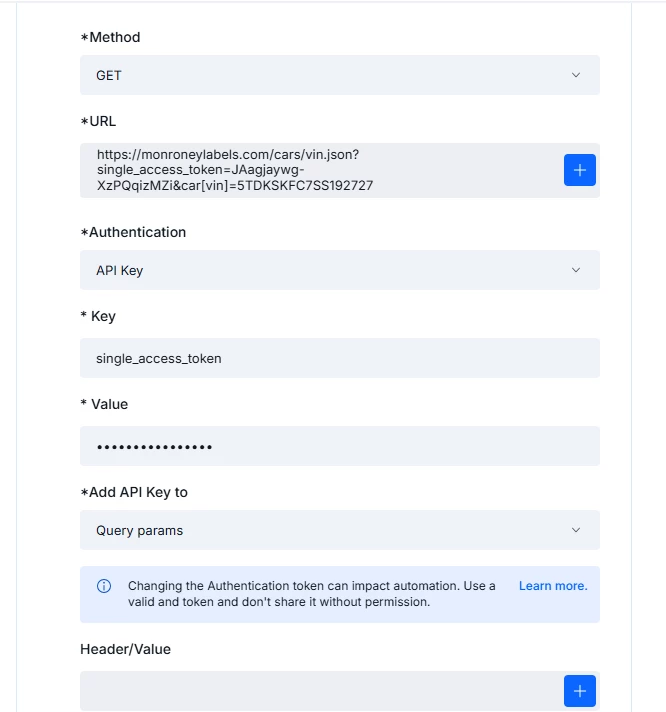
I set it up in Pipefy like this 

  • Method: GET

  • URL: (full URL with both query params, as above)

  • Authentication: No auth

  • No headers, no request body

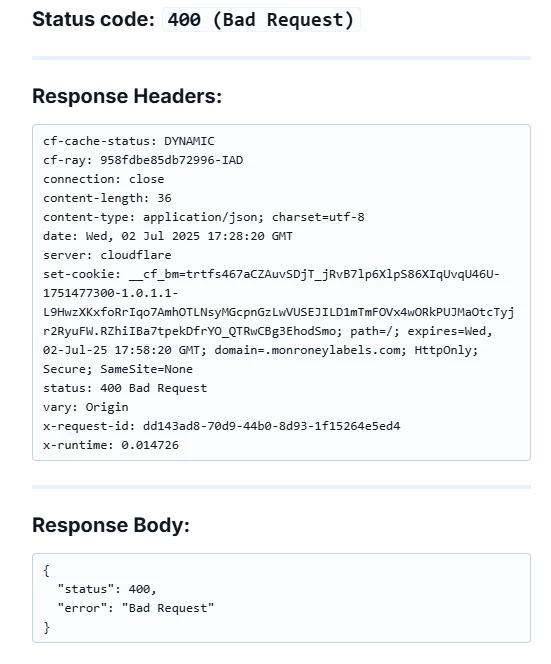
In Postman and Chrome, this exact URL works and returns 200 OK. But in Pipefy, it always returns 400 Bad Request. 

How can I get Pipefy to actually send the query params? Is this a bug or is there a workaround?

Best answer by joao-quint

Please see this documentation about how to use our HTTP request example:

https://help.pipefy.com/en/articles/8395036-examples-of-http-requests-with-pipefy-automations

3 replies

joao-quint
Pipefy Staff
Forum|alt.badge.img+5
  • Pipefy Staff
  • August 13, 2025

Hi,


Can you please show either screenshots or video where are you getting your error as well as the request you are sending.


Regards

Joao Quint

Support Team


avi.targetmotors

The first picture is the request I'm sending, the second one is the results I'm getting. If I run the exact same request in Postman, I get the results I'm looking for, but in pipefy, it's always giving me the 400 bad request


joao-quint
Pipefy Staff
Forum|alt.badge.img+5
  • Pipefy Staff
  • Answer
  • August 19, 2025

Please see this documentation about how to use our HTTP request example:

https://help.pipefy.com/en/articles/8395036-examples-of-http-requests-with-pipefy-automations